Page 15 of 29
Re: Ford As Built Data Deciphering
Posted: Mon Aug 14, 2017 10:18 am
by Zedhed
Beautiful bit of work ClockWorK.
Just had a 30 minute browse & can see what I need already.
I'll post any positive result I get once I trial it tomorrow.
Re: Ford As Built Data Deciphering
Posted: Mon Aug 14, 2017 6:02 pm
by ClockWorK
Thanks! I'm always glad when my programs can help people.
Re: Ford As Built Data Deciphering
Posted: Fri Aug 18, 2017 1:07 pm
by omar302
Spootcat wrote:I added the AWD module and engine hours gauges. Some other odd things came up as a result. One, there's the little speed limit indicator that shows up in my nav pane now that wasn't there before, and, one of my left side gauges (miles remaining maybe) used to have an RPM gauge along with the fuel gauge, the RPM is now gone, just fuel. I have seen a pic where someone posted their AWD screen and it has the RPM gauge, I'd like that. Any ideas? Played with the DRL setting in that module, but these were the only IPC changes made.
Here are the settings I updated:
720-01-02 8AF8 6F70 3DC8 (OEM)
720-01-02 BAF8 6F73 3DFB (MOD)
The 8 to B enabled the AWD screen, the 3 in the second data block enabled the hours count screen. Any clues as to how to enable the RPM gauge, or why the speed limit indicator came on?
Also, there are two gear indicator icons, a big one in the tach cluster and a smaller one that sits in the lower shaded area where the odometer is. Any way to make the smaller one permanently on?
2016 Taurus SHO
Cheers!
Spootcat
There should be a option to enable it in the settings menu of the left screen. By default it is fuel gauge only & probably during your changes it was reset to default.
Re: Ford As Built Data Deciphering
Posted: Thu Aug 24, 2017 1:49 pm
by Kingsammy
@ClockWork
the ETIS homepage has changed. And i think also the HTML-Code. Your AS-Built Compare program can't read downloaded html side(s). Please could you fix the problem? Many thanks in advance.
Re: Ford As Built Data Deciphering
Posted: Thu Aug 24, 2017 2:38 pm
by ClockWorK
I will take a look.
However, I know their site changed a couple months ago, and I updated the program then. If you haven't, make sure you've got the current version with the AsBuilt browser tab.
Re: Ford As Built Data Deciphering
Posted: Sun Aug 27, 2017 2:21 am
by DirtyHarry
I've picked the elmconfig usb unit that has the hs/ms switch. The lastest forscan for windows, had me toggle from one to the other on the fly to find all the Explorer's units.
Re: Ford As Built Data Deciphering
Posted: Wed Sep 06, 2017 6:34 pm
by JetExpress_6.7
Hi all!
Any 10-14 Mustang guys/gals on here that have tried modifying as built configs? I've been searching for sometime now for a spreadsheet or forum to join and help/learn from, no such luck yet...
Re: Ford As Built Data Deciphering
Posted: Fri Sep 08, 2017 5:24 pm
by Mustang5L5
JetExpress_6.7 wrote:Hi all!
Any 10-14 Mustang guys/gals on here that have tried modifying as built configs? I've been searching for sometime now for a spreadsheet or forum to join and help/learn from, no such luck yet...
Not for the '10-14 but here are some links for '15+. Unsure if they would apply to the earlier models as well
http://www.mustang6g.com/forums/showthread.php?t=61773
https://docs.google.com/spreadsheets/d/ ... edit#gid=0
Re: Ford As Built Data Deciphering
Posted: Fri Sep 08, 2017 6:57 pm
by ClockWorK
Kingsammy wrote:@ClockWork
the ETIS homepage has changed. And i think also the HTML-Code. Your AS-Built Compare program can't read downloaded html side(s). Please could you fix the problem? Many thanks in advance.
All fixed. There is a new version available on my website.
Re: Ford As Built Data Deciphering
Posted: Thu Sep 14, 2017 12:15 am
by Mustang5L5
ClockWorK wrote:I may be the one who told the FORScan team how I did it so they could add it.
Want engine hours while you're here? I just added to mine.
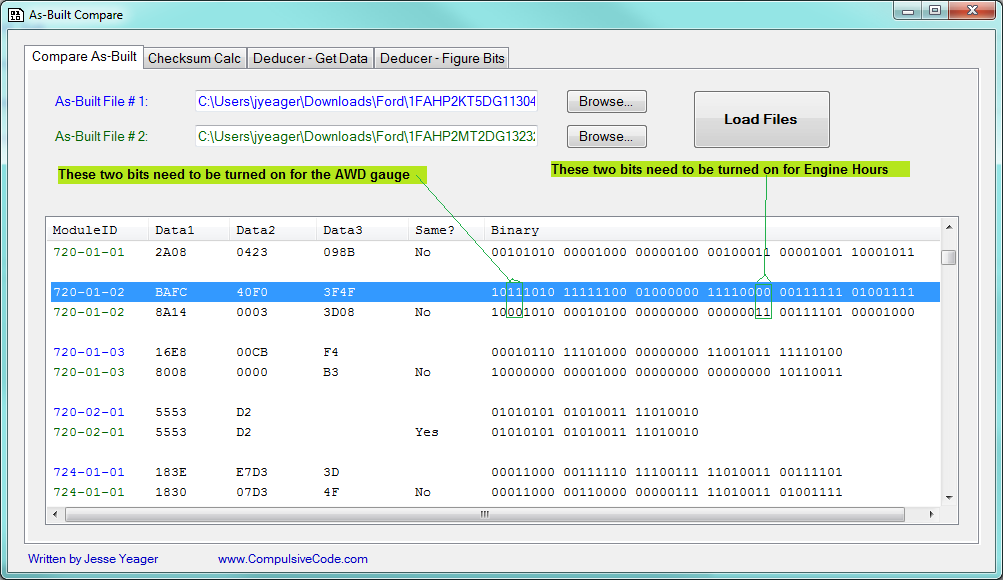
After adding it, I really had to dig through the gauges/settings to find the engine hours listed, but it's there now. Starts at zero.
Basically I changed the F0 to an F3.
SO I tested this out tonight on my '14 Taurus Limited, and strangely enough it did not work. Keep getting the error "incompatible configuration"
Just to conform
720-01-02 xxxx xxxX xxxx
X = 0 engine hours disabled
X = 3 engine hours enabled.
Not working for me