Page 5 of 7
Re: 2.4.1 - APIM Firmware update doesn't work
Posted: Fri Sep 18, 2020 6:41 pm
by kurek99
During the APIM update and at 99% an error popped up and the update was interrupted and now the radio does not work. Can you save it somehow? pops up when loading firmware: Unable to read current firmware p \ n:

Re: 2.4.1 - APIM Firmware update doesn't work
Posted: Fri Sep 18, 2020 7:08 pm
by AHNA1711
2B-4G10 wrote: Sun Sep 13, 2020 4:13 pm
Guys i updated ACM and APIM, first APIM, the sound system was still fine then, after that i updated the ACM to a version that was different than my version, but all was green, and i made sure what my version was, all of them, anyhow the update ruined sound, i updated them back to the original version, all of them, still nothing.
TL;DR
After ACM update Volume shows 0 only. Sound is so low. Coming from central console speaker only. Screen is Sync3 2018, but updated to CyanLabs V3.4
What i tried:
- Reverting versions to prior updates.
- Resetting Module.
- Clearing CEL codes.
UPDATE:
It was loading AB files


it's all fixed now !
Yes just load Factory AB to restore the sound after ACM update. This happened to me too

Re: 2.4.1 - APIM Firmware update doesn't work
Posted: Fri Sep 18, 2020 7:09 pm
by AHNA1711
kurek99 wrote: Fri Sep 18, 2020 6:41 pm
During the APIM update and at 99% an error popped up and the update was interrupted and now the radio does not work. Can you save it somehow? pops up when loading firmware: Unable to read current firmware p \ n:
Did you take a picture of your original APIM Calibration files before you update it?
Re: 2.4.1 - APIM Firmware update doesn't work
Posted: Fri Sep 18, 2020 7:12 pm
by kurek99
I have a saved APIM configuration before the upgrade. Saved configuration before programming.

Re: 2.4.1 - APIM Firmware update doesn't work
Posted: Fri Sep 18, 2020 7:24 pm
by AHNA1711
kurek99 wrote: Fri Sep 18, 2020 7:12 pm
I have a saved APIM configuration before the upgrade. Saved configuration before programming.
Use
Forscan v2.4.0 to update the APIM calibration. Select custom firmware and upload the original files of your APIM then click update.
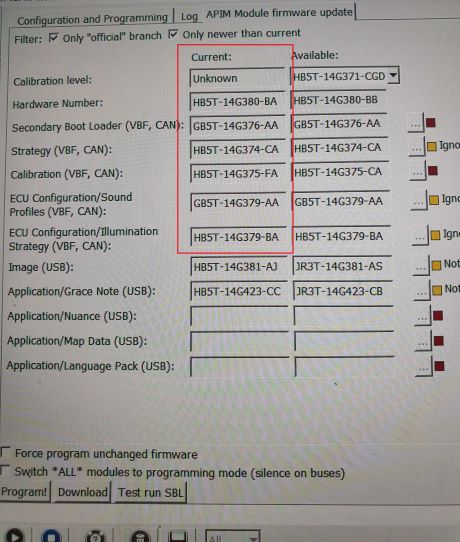
- Untitled.jpg (52 KiB) Viewed 4492 times
Re: 2.4.1 - APIM Firmware update doesn't work
Posted: Fri Sep 18, 2020 7:33 pm
by kurek99
Where can I download Forscan 2.4.0? someone can send an email to:
kurek99@o2.pl
Re: 2.4.1 - APIM Firmware update doesn't work
Posted: Fri Sep 18, 2020 8:51 pm
by MoJo88
Doesn't 2.4.2 have this function?
Re: 2.4.1 - APIM Firmware update doesn't work
Posted: Fri Sep 18, 2020 9:25 pm
by kurek99
AHNA1711 wrote: Fri Sep 18, 2020 7:24 pm
kurek99 wrote: Fri Sep 18, 2020 7:12 pm
I have a saved APIM configuration before the upgrade. Saved configuration before programming.
Use
Forscan v2.4.0 to update the APIM calibration. Select custom firmware and upload the original files of your APIM then click update.
Untitled.jpg
Failed to. Same error. Used Forscan 2.4.0 20200309

Re: 2.4.1 - APIM Firmware update doesn't work
Posted: Sat Sep 19, 2020 2:48 am
by kurek99
AHNA1711 wrote: Fri Sep 18, 2020 7:09 pm
Did you take a picture of your original APIM Calibration files before you update it?
I don't have a photo before updating
Re: 2.4.1 - APIM Firmware update doesn't work
Posted: Sat Sep 19, 2020 5:46 am
by AHNA1711
Are you able to get your Hardware Number?
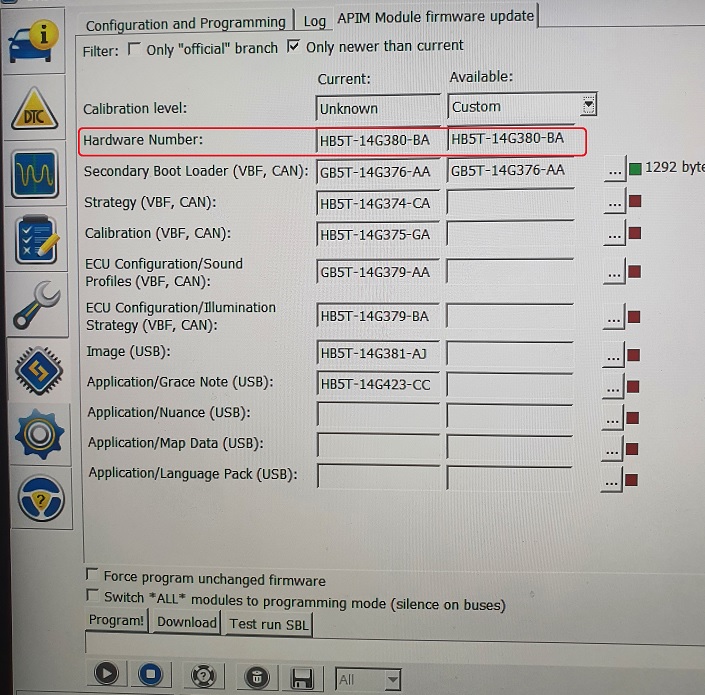
- Untitled.jpg (186.63 KiB) Viewed 4416 times

 it's all fixed now !