Hi Jamie,
I am a guy who knows nothing about programming, I have followed your instructions and successfully downloaded 2 files abd.txt and comms.log. I would be grateful if you could take a look to see if my Mazda 3 2.0L 4-speed is capable of activating cruise control? if yes, please show me where to change? I really appreciate your understanding and help.
FORScan PCM reprogramming (as-built) RX-8 (+other Mazdas...)
Re: FORScan PCM reprogramming (as-built) RX-8 (+other Mazdas...)
Hi Jamei,
I used your tool and successfully changed 2 cases:
1. Change line 2 FF => FE turn on the cruise steering switch but cruise light on the dashboard does not light
2. Changing line 3 FF => F3 result the same turn on the cruise steering switch but cruise light on the dashboard does not light
In both cases I didn't get a warning error, I don't know what to do now.
I have installed enough 4-pin brake switch and steering switch with cruise control.
I used your tool and successfully changed 2 cases:
1. Change line 2 FF => FE turn on the cruise steering switch but cruise light on the dashboard does not light
2. Changing line 3 FF => F3 result the same turn on the cruise steering switch but cruise light on the dashboard does not light
In both cases I didn't get a warning error, I don't know what to do now.
I have installed enough 4-pin brake switch and steering switch with cruise control.
-
JamieM
- Posts: 40
- Joined: Sat Jun 11, 2016 9:53 pm
- Vehicle: Mazda RX-8, 2005, 13B-MSP Renesis High Power (231)
- Location: Cambridgeshire, UK
Re: FORScan PCM reprogramming (as-built) RX-8 (+other Mazdas...)
The cruise control mod (rx8cc) is designed for the RX-8, and although it does seem to work on some other Mazdas from a similar era, this is mostly by fluke and there is no guarantee of it working properly on all models. If it doesn't work on your specific car, then I'm afraid I can't really help - with the exception of the byte that controls cruise activation, I don't really know which bits of the as-built data do what on an RX-8, let alone other cars!
Finding out the cruise byte was mostly a process of trial and error, combined with comparing the data from several different RX-8s both with and without cruise control to determine the common denominator. The second tool I released (rx8abd) gives you full control over the entire as-built data block, so if you're feeling brave, you could do some similar experimentation. Although, I believe FORScan itself has now added this feature for most cars since I wrote the tool, so mine is kind of obsolete anyway. Other than looking up the data for other cars of your same model both with and without cruise control and comparing, I don't really know what else to suggest. Sorry!
Having said all of that, it does look like you are on the right track, given that something cruise-related is happening with the buttons. There are many reasons for cruise control not engaging (even when it is properly enabled in the data), some unrelated to software, but again this varies from car to car so I can't really give any specific advice on models other than the RX-8. It only works over a certain minimum speed, all other related sensors must be in full working order, etc. etc.
Good luck!
Finding out the cruise byte was mostly a process of trial and error, combined with comparing the data from several different RX-8s both with and without cruise control to determine the common denominator. The second tool I released (rx8abd) gives you full control over the entire as-built data block, so if you're feeling brave, you could do some similar experimentation. Although, I believe FORScan itself has now added this feature for most cars since I wrote the tool, so mine is kind of obsolete anyway. Other than looking up the data for other cars of your same model both with and without cruise control and comparing, I don't really know what else to suggest. Sorry!
Having said all of that, it does look like you are on the right track, given that something cruise-related is happening with the buttons. There are many reasons for cruise control not engaging (even when it is properly enabled in the data), some unrelated to software, but again this varies from car to car so I can't really give any specific advice on models other than the RX-8. It only works over a certain minimum speed, all other related sensors must be in full working order, etc. etc.
Good luck!
Re: FORScan PCM reprogramming (as-built) RX-8 (+other Mazdas...)
Dear Jamie,
I really appreciate your enthusiastic help which makes me feel happy!
I used FORScan latest version but it does not support my car, so I used your really powerful tool, I used it to adjust PCM it runs smoothly. I'm glad to hear you tell me I'm on the right track maybe I'll refer by bretman's way like he said: "we've gone this far, why stop now ..." I won't stop either.
Have a nice weekend!
I really appreciate your enthusiastic help which makes me feel happy!
I used FORScan latest version but it does not support my car, so I used your really powerful tool, I used it to adjust PCM it runs smoothly. I'm glad to hear you tell me I'm on the right track maybe I'll refer by bretman's way like he said: "we've gone this far, why stop now ..." I won't stop either.
Have a nice weekend!
Re: FORScan PCM reprogramming (as-built) RX-8 (+other Mazdas...)
Hi Jamei,
I did some similar experimentation as your advice and I found down that PCM in Mazda3 with cruise control looks like the same with RX8 just change PCM2 FF=> FE. Luckily for me, FORscan has just updated to version 2.3.26 so I found the PCM as-built file it clearly shows that your power tool has been working and changed PCM mazda3 thank you very much!
However, my cruise control is not working, but I am sure that I'm on the right track and that cruise control in PCM is activated. Now I will have to check the hardware to find the cause. Thank you once again!
My original PCM2 : 3DFF FFFF FF4B
Some PCM2 block in the others look like almost the same mine only one data FF<=>FE. Some have 2 : 3D<=>35 & FF<=>FE
But the data FE always present so I changed my PCM2 block from 3DFF FFFF FF4B => 3DFF FFFF FE4A it looks like RX8 right?
I did some similar experimentation as your advice and I found down that PCM in Mazda3 with cruise control looks like the same with RX8 just change PCM2 FF=> FE. Luckily for me, FORscan has just updated to version 2.3.26 so I found the PCM as-built file it clearly shows that your power tool has been working and changed PCM mazda3 thank you very much!
However, my cruise control is not working, but I am sure that I'm on the right track and that cruise control in PCM is activated. Now I will have to check the hardware to find the cause. Thank you once again!
- 5.png (26.54 KiB) Viewed 4078 times
- cc.png (26.68 KiB) Viewed 4078 times
- PCME.png (59.71 KiB) Viewed 3922 times
But the data FE always present so I changed my PCM2 block from 3DFF FFFF FF4B => 3DFF FFFF FE4A it looks like RX8 right?
- PCME1.png (60.04 KiB) Viewed 3922 times
- VIN.png (30.44 KiB) Viewed 3918 times
- Attachments
-
- 3.png (27.38 KiB) Viewed 4078 times
Re: FORScan PCM reprogramming (as-built) RX-8 (+other Mazdas...)
Hi JamieM and others,
I also tried to run the rx8cc.2.1.1.beta.zip file from https://www.rx8ownersclub.co.uk/forum/v ... 30&t=74833 and received the same error as user zedzed:
I have a Mazda CX-5 2014 (manual transmission, VIN JMZKEC97600293188).
Any ideas what the issue could be? Wrong (default) key? Executable program not compatible with CX5 2014?
Furthermore, I have to admit that it is not clear to me which module I need to touch at all in FORScan to activate Cruise Control. I have found articles on the internet which focus on PCM and others on RBCM. I assume following this thread that it's the PCM. But please confirm!?
Another thing which seems to be very different in my case is that I just do see 2 PCM blocks in FORScan vs. 9 PCM blocks for most users in this thread. What could be the cause for this?
Anyhow, for sake of completeness here are my hex codes for PCM and R_BCM:
PCM
;Block 1
7E0G1G14A4D5A4B456A
7E0G1G2433937363003
7E0G1G33032393331EA
7E0G1G43838FFFFFF59
7E0G1G5FF2AFFFFFF13
7E0G1G6FFFFFFFFFFE9
7E0G1G7FFFFFFFFFFEA
7E0G1G8FFFFFFFFFFEB
7E0G1G9FFFFFFFFFFEC
7E0G1GAFFFFFFFFFFF3
7E0G1GBFFFFFFFFFFF4
7E0G1GCFFFFFFFFFFF5
7E0G1GDFFFFFFFFFFF6
7E0G1GEFFFFFFFFFFF7
7E0G1GFFFFFFFFFFFF8
7E0G1H0FFFFFFFFFFF9
7E0G1H1FFFFFFFFFFFA
7E0G1H2FFFFFFFFFFFB
7E0G1H3FFFFFFFFFFFC
7E0G1H4FFFFFFFFFF03
7E0G1H5FFFFFFFFFF04
7E0G1H6FFFFFFFFFF05
7E0G1H7FFFFFFFFFF06
7E0G1H8FFFFFFFFFF07
7E0G1H9FFFFFFFFD4DD
7E0G1HAFCFF3039
;Block 2
7E0G2G1000026840094
7E0G2G2000C7E000075
7E0G2G3000006C102B5
7E0G2G4DE0ACD007B1D
7E0G2G50005000000F3
7E0G2G60000000000EF
7E0G2G70000000000F0
7E0G2G80000000000F1
7E0G2G90000000000F2
7E0G2GA0000000000F9
7E0G2GB0000000000FA
7E0G2GC0000000000FB
7E0G2GD0000000000FC
7E0G2GE0000000000FD
7E0G2GF000050D70025
7E0G2H00000000000FF
7E0G2H1000000000000
7E0G2H2000000000001
7E0G2H3000000000002
7E0G2H4000000000009
7E0G2H500000000000A
7E0G2H600000000000B
7E0G2H700000000000C
7E0G2H800000000000D
7E0G2H900000000000E
7E0G2HA0000000F
R_BCM:
;Block 1
7B7G1G185500004A13A
7B7G1G2A501C3000832
7B7G1G3001854002E
;Block 2
7B7G2G10028100000F9
I appreciate your help!
I also tried to run the rx8cc.2.1.1.beta.zip file from https://www.rx8ownersclub.co.uk/forum/v ... 30&t=74833 and received the same error as user zedzed:
- Screenshot (12).png (181.45 KiB) Viewed 3719 times
Any ideas what the issue could be? Wrong (default) key? Executable program not compatible with CX5 2014?
Furthermore, I have to admit that it is not clear to me which module I need to touch at all in FORScan to activate Cruise Control. I have found articles on the internet which focus on PCM and others on RBCM. I assume following this thread that it's the PCM. But please confirm!?
Another thing which seems to be very different in my case is that I just do see 2 PCM blocks in FORScan vs. 9 PCM blocks for most users in this thread. What could be the cause for this?
Anyhow, for sake of completeness here are my hex codes for PCM and R_BCM:
PCM
;Block 1
7E0G1G14A4D5A4B456A
7E0G1G2433937363003
7E0G1G33032393331EA
7E0G1G43838FFFFFF59
7E0G1G5FF2AFFFFFF13
7E0G1G6FFFFFFFFFFE9
7E0G1G7FFFFFFFFFFEA
7E0G1G8FFFFFFFFFFEB
7E0G1G9FFFFFFFFFFEC
7E0G1GAFFFFFFFFFFF3
7E0G1GBFFFFFFFFFFF4
7E0G1GCFFFFFFFFFFF5
7E0G1GDFFFFFFFFFFF6
7E0G1GEFFFFFFFFFFF7
7E0G1GFFFFFFFFFFFF8
7E0G1H0FFFFFFFFFFF9
7E0G1H1FFFFFFFFFFFA
7E0G1H2FFFFFFFFFFFB
7E0G1H3FFFFFFFFFFFC
7E0G1H4FFFFFFFFFF03
7E0G1H5FFFFFFFFFF04
7E0G1H6FFFFFFFFFF05
7E0G1H7FFFFFFFFFF06
7E0G1H8FFFFFFFFFF07
7E0G1H9FFFFFFFFD4DD
7E0G1HAFCFF3039
;Block 2
7E0G2G1000026840094
7E0G2G2000C7E000075
7E0G2G3000006C102B5
7E0G2G4DE0ACD007B1D
7E0G2G50005000000F3
7E0G2G60000000000EF
7E0G2G70000000000F0
7E0G2G80000000000F1
7E0G2G90000000000F2
7E0G2GA0000000000F9
7E0G2GB0000000000FA
7E0G2GC0000000000FB
7E0G2GD0000000000FC
7E0G2GE0000000000FD
7E0G2GF000050D70025
7E0G2H00000000000FF
7E0G2H1000000000000
7E0G2H2000000000001
7E0G2H3000000000002
7E0G2H4000000000009
7E0G2H500000000000A
7E0G2H600000000000B
7E0G2H700000000000C
7E0G2H800000000000D
7E0G2H900000000000E
7E0G2HA0000000F
R_BCM:
;Block 1
7B7G1G185500004A13A
7B7G1G2A501C3000832
7B7G1G3001854002E
;Block 2
7B7G2G10028100000F9
I appreciate your help!
-
JamieM
- Posts: 40
- Joined: Sat Jun 11, 2016 9:53 pm
- Vehicle: Mazda RX-8, 2005, 13B-MSP Renesis High Power (231)
- Location: Cambridgeshire, UK
Re: FORScan PCM reprogramming (as-built) RX-8 (+other Mazdas...)
The CX-5 is so much newer and of such a different design to the RX-8, that there isn't much hope of a program designed specifically to flip a particular bit in the PCM as-built data of the RX-8 actually working on the CX-5. It is of the new Mazda "Kodo" generation / design, and therefore effectively a completely different car.
The as-built data looks very different for a start, I have no idea why there's 2 blocks of PCM data, and as you alluded to there is not even any guarantee that some other module (or multiple) aren't responsible for cruise control on the CX-5 rather than the PCM. The CX-5 probably has a completely different set of control modules compared to the RX-8, given that the electrical system design is about 10 years newer and technology has moved on a lot since then.
It's very likely that the set of commands required to talk to the PCM / the sequence in which they must be sent has changed in 10 years. I'm afraid I don't know anything about the CX-5's modules/electrical system. To be honest it's a good job the program didn't work, as I have no idea what it might have done! Running it on your CX-5 blind was a very bad idea, the bit that is flipped might well control something completely different on the CX-5 - who knows what it might have done. If it had have worked I guess it's reversible so not too big of an issue, but still.
I'd possibly recommend starting a new thread about it, you might have more luck because this one is more focused on the RX-8 and the one or two other cars from that generation. The CX-5 is definitely not from that same generation
The as-built data looks very different for a start, I have no idea why there's 2 blocks of PCM data, and as you alluded to there is not even any guarantee that some other module (or multiple) aren't responsible for cruise control on the CX-5 rather than the PCM. The CX-5 probably has a completely different set of control modules compared to the RX-8, given that the electrical system design is about 10 years newer and technology has moved on a lot since then.
It's very likely that the set of commands required to talk to the PCM / the sequence in which they must be sent has changed in 10 years. I'm afraid I don't know anything about the CX-5's modules/electrical system. To be honest it's a good job the program didn't work, as I have no idea what it might have done! Running it on your CX-5 blind was a very bad idea, the bit that is flipped might well control something completely different on the CX-5 - who knows what it might have done. If it had have worked I guess it's reversible so not too big of an issue, but still.
I'd possibly recommend starting a new thread about it, you might have more luck because this one is more focused on the RX-8 and the one or two other cars from that generation. The CX-5 is definitely not from that same generation
Re: FORScan PCM reprogramming (as-built) RX-8 (+other Mazdas...)
Thanks a lot, JamieM, for the quick response.
I totally agree that it was quite dangerous running your program but I just could not figure out from this and other threads what bits I have to change where. Your program was "the last resort".
That's a good idea starting a new thread. Will do it right away. Thanks.
I totally agree that it was quite dangerous running your program but I just could not figure out from this and other threads what bits I have to change where. Your program was "the last resort".
That's a good idea starting a new thread. Will do it right away. Thanks.
Re: FORScan PCM reprogramming (as-built) RX-8 (+other Mazdas...)
Hello. I have a 2005 rx8 192hp, and trying to get CC with no succes. I have tried 2 elm327 adapters, one is usb and the other is bluetooth. The only "meaningful" result was this ones. If I try at 500k baud i get stuck.
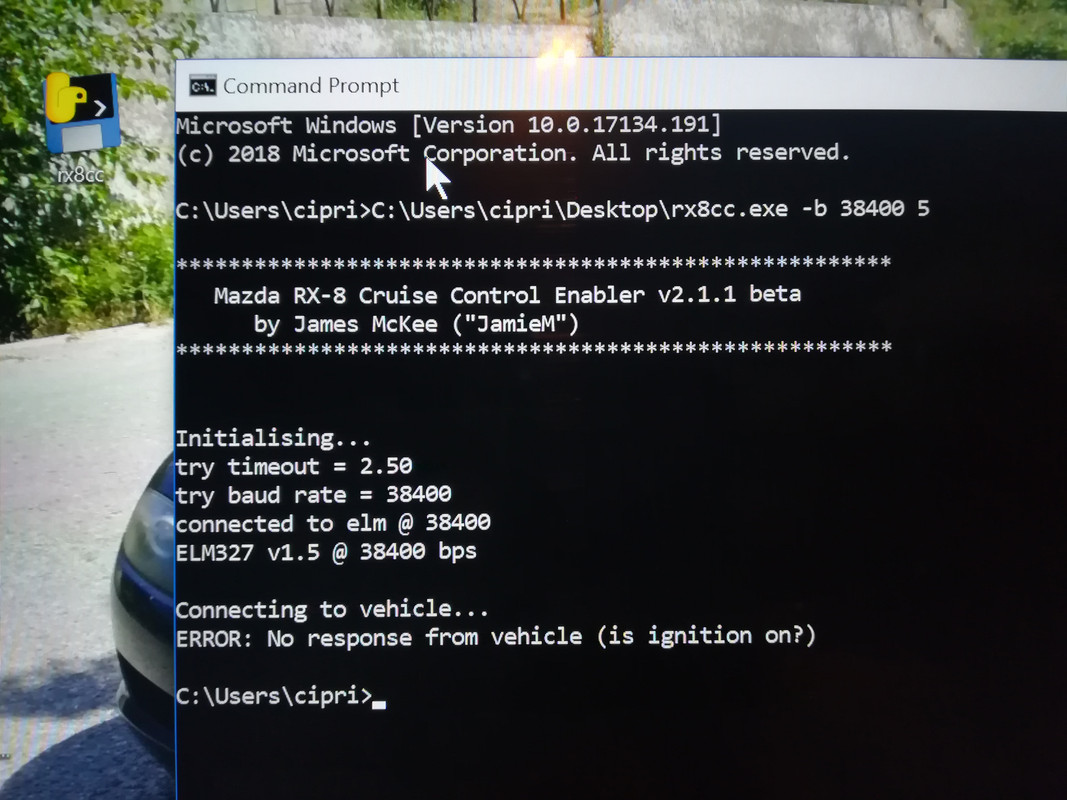
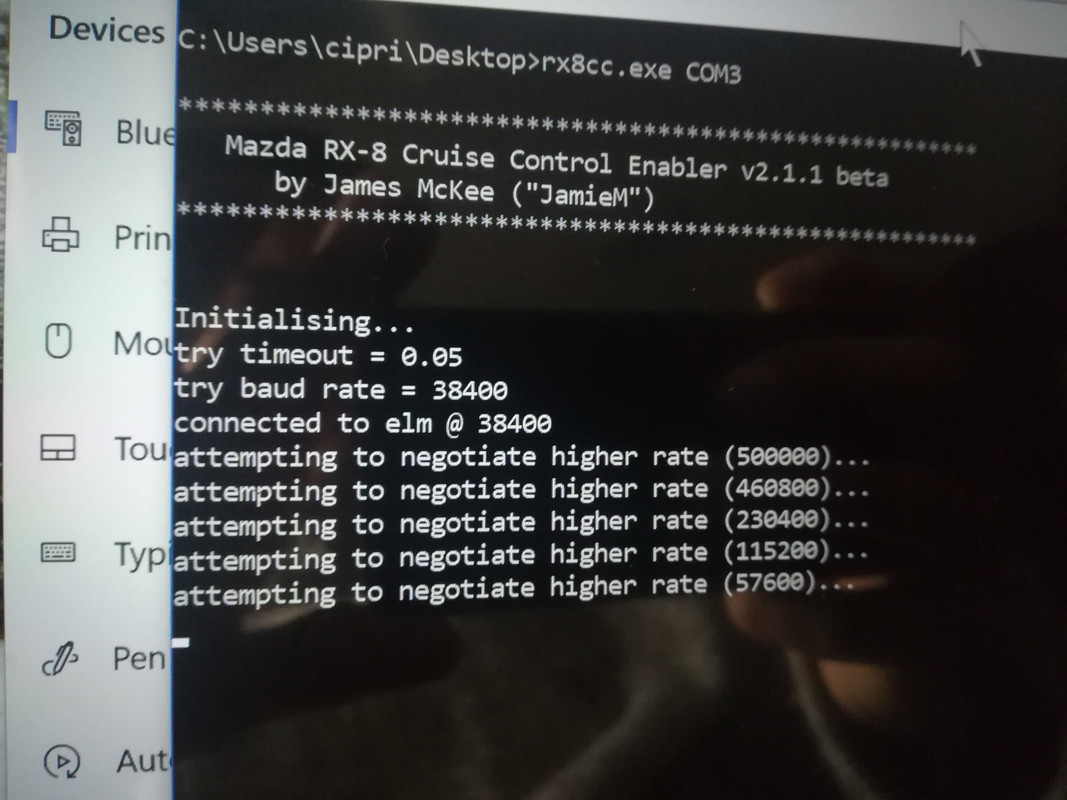
The result is like thw obd2 connector is not even plugged in. I tried it with the engine off and ignition on, and even with the engine on. Please mind that both adapters work with regular obd2 apps and can connect to show live data. Drivers are fine and no error in device manager is shown.
My adapters are :
And
Any help is greatly appreciated.
The result is like thw obd2 connector is not even plugged in. I tried it with the engine off and ignition on, and even with the engine on. Please mind that both adapters work with regular obd2 apps and can connect to show live data. Drivers are fine and no error in device manager is shown.
My adapters are :
- ELM327-USB-V1-5-OBD2-Car-Diagnostic-Interface-Scanner-ELM-327-V-1-5-OBDII-Diagnostic.jpg (153.36 KiB) Viewed 3392 times
- res_3b4621a0c4fb55180b6f3b3f95f4e028_full.jpg (41.19 KiB) Viewed 3392 times
Any help is greatly appreciated.
Re: FORScan PCM reprogramming (as-built) RX-8 (+other Mazdas...)
It turns out you have to use an obd2 adapter that has that MS HS switch to it. I found one(and it was on bluetooth too) and it worked to enable my CC on the RX8. My previous 2 adapters could not.