Page 1 of 2
Enabling DRL on Explorer
Posted: Thu Mar 31, 2016 3:55 am
by sheltonfilms
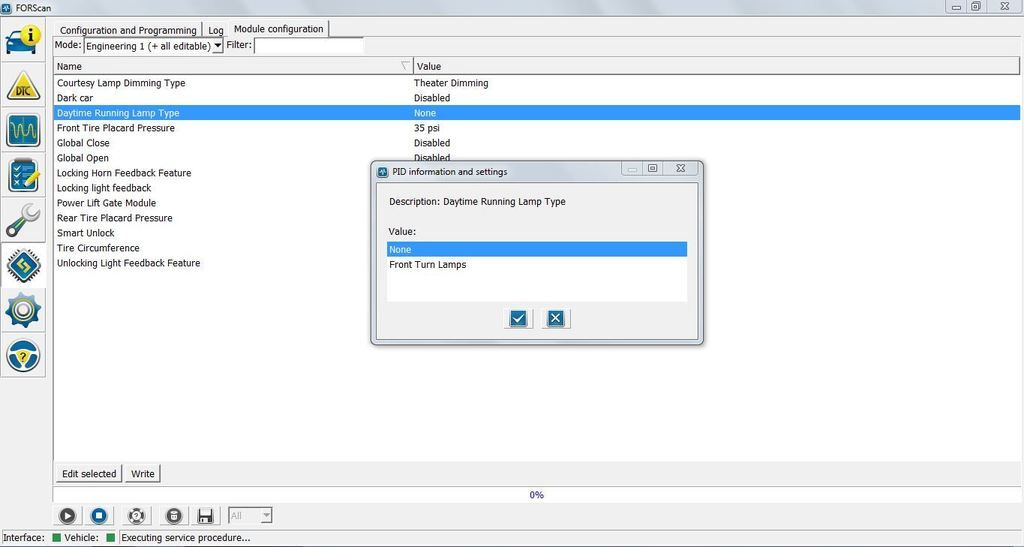
On my 2013 Explorer I turned on DRL in the Body Control Module programming and config section.
Only selection available is Front Turn Signals. My Explorer has OEM HID lights so this is the recommended setting for DRLs. So I thought at First forscan someone figured out I had HIDs and only allows this selection. I tried Engineering 1 and 2 menus and nothing changed.
But,
I talked to a friend of mine and he has Halogen headlamps and he only has the Front Turn signal option.
IDS shows both options when adding DRLs (front turn signals (HIDs) or low beams (halogen).
Re: Enabling DRL on Explorer
Posted: Mon Apr 04, 2016 2:31 am
by FORScan
sheltonfilms wrote:
IDS shows both options when adding DRLs (front turn signals (HIDs) or low beams (halogen).
This is not exactly correct, actually current FORScan behaviour completely matches to the IDS one for this PID. In fact, in IDS it depends on vehicle.
In summary, we see 4 possible options for this setting:
None
Low Beam
Front Fog Lamps
Front Turn Lamps
Depending on the model, not all of these options are available. Some have only Front Turn Lamps, like yours. Some have only Low Beam, etc. Not sure why is so, we guess some of these options may be not really supported. Anyway, we can make all of these available for all models (although cannot guarantee all of these options will really work and don't throw, for example, "incompatible configuration" error).
Re: Enabling DRL on Explorer
Posted: Mon Apr 04, 2016 4:57 pm
by Schimi
FORScan wrote:sheltonfilms wrote:
....... Anyway, we can make all of these available for all models (although cannot guarantee all of these options will really work and don't throw, for example, "incompatible configuration" error).
i had the same... only turn light is possible as DRL.... i love the idea to turn the turn lights off and use the fog lamps as DRL..
Re: Enabling DRL on Explorer
Posted: Mon May 09, 2016 6:10 am
by Schimi
Hi,
it's possible to turn the "fog light on info lamp" off if i use the fog lights as drl?
That's the one reason why i "can't " use them... Because my wife always say "it looks terrible " ☺
Re: Enabling DRL on Explorer
Posted: Tue May 10, 2016 4:43 am
by FORScan
Schimi wrote:
it's possible to turn the "fog light on info lamp" off if i use the fog lights as drl?
Sorry, we don't quite understand this part (what exactly you try to do - disable fog warning lamp in the instrument cluster?)
Re: Enabling DRL on Explorer
Posted: Tue May 10, 2016 7:42 am
by Schimi
Yes, i mean the warning lamp...
If i use the fog lamps as drl.. Then the warning lamp ist showing in the instrument cluster... that looks a little curious..
So it would be great if it be possible to disable rhe warning lamp if the fog lamps are used as drl light...
If it's ot possible then i use the "normal" lamps as drl but te fog lamps looks nicer
Re: Enabling DRL on Explorer
Posted: Fri May 13, 2016 1:31 pm
by Schimi
If some tests are needed... Tell me what to do ☺
Re: Enabling DRL on Explorer
Posted: Sat May 14, 2016 11:21 am
by FORScan
Theoretically disabling warning lamps in instrument cluster is possible, and such options are available in some cases. For example, if a vehicle may be with out without ABS or ESP, configuration have bits or bytes that responsible for displaying ABS or ESP lamps on the cluster. So theoretically it is possible that on vehicles without fog lamps in stock the warning lamp is disabled via configuration. So comparing AB data for vehicles with and without fog lamps you can try to find bytes in AB that are responsible for this option. Again, this is just theoretically, practically we don't know how to do it.
Re: Enabling DRL on Explorer
Posted: Wed Jul 27, 2016 5:06 pm
by DanMc85
I know on the 2014 Fusion the fog light indicator is at the end of 720-01-02, in the last box, first bit. For example a 1 enables and 0 disables. Mine is currently a 5, so if I go to a 4 it turns the fog indicator off.
Not sure if your car is similar
I'd love to have my amber sidemarker parking lights as DRL, if anyone knows a possible bit for that.
I know the 2015 F-150 and 2016 explorer share extremely similar BCM coding to my vehicle.
Re: Enabling DRL on Explorer
Posted: Wed Jul 27, 2016 5:14 pm
by Schimi
any idea?
720-01-02
F42C 0862 984C
11110100 00101100 00001000 01100010 10011000 01001100