MS-CAN inaccessible on Mondeo Mk3 TDCi (ELS27, or vLinker FS USB w/OBD-extension)

Discussion about adapters and connections - usage, problems, solutions
pswiatki
Posts: 19
Joined: Thu Jun 07, 2018 10:45 pm
Vehicle: Mondeo Mk3 TDCi 2.0 96kW 2006

MS-CAN inaccessible on Mondeo Mk3 TDCi (ELS27, or vLinker FS USB w/OBD-extension)

Post by pswiatki »

I mentioned it in the vLinker FS USB post, but here again with more details:

the problem started with ELS27 which experienced trouble accessing modules on the MS-CAN bus in my car.
Specifically: SRM, EATC, ACM:

Image

Later on, my ELS27 experienced a major failure - the FFC between the OBD connector and the PCB cracked and, obviously, any communication immediately ceased.

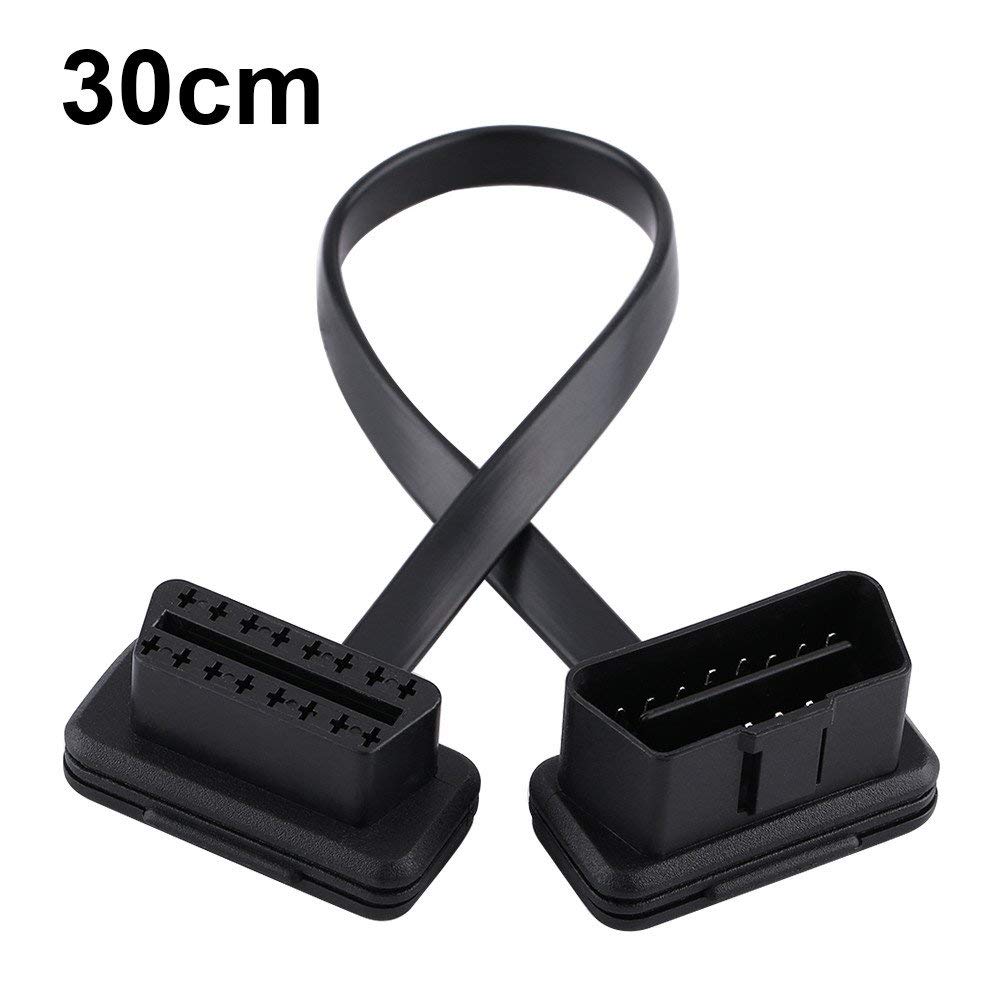
Now, when I got the vLinker FS USB interface, I immediately tested it to see if I could reliably communicate with all the modules in the car (as I had been able to before the failure). That worked OK, mostly. However, to have better access to the OBD interface (vLinker, ELS27, or whatever) I also got a relatively short piece of OBD extension:

Image

It has 1:1 pins, but strangely the MS-CAN modules cannot be accessed if vLinker FS USB is not plugged directly into the car's OBD connector.
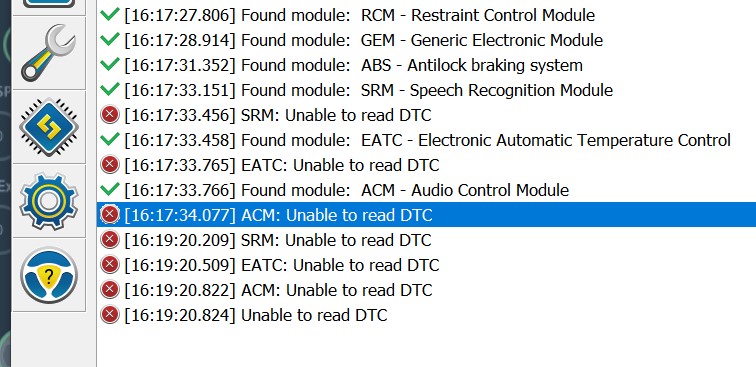
This is the situation in the log (two attempts are shown in it):

Image

Sure, the initial green status comes from the loaded profile, so all modules stored previously are listed again. However, they do not respond when DTC read operations are attempted on FORScan initialization. Why does it behave like that?
Last edited by pswiatki on Mon Feb 17, 2025 2:10 am, edited 1 time in total.
pswiatki
Posts: 19
Joined: Thu Jun 07, 2018 10:45 pm
Vehicle: Mondeo Mk3 TDCi 2.0 96kW 2006

Re: MS-CAN inaccessible on Mondeo Mk3 TDCi (ELS27, or vLinker FS USB w/OBD-extension)

Post by pswiatki »

In case this is important: the modules on the MS-CAN have the following configuration:

Code: Select all

SRM - Speech Recognition Module
Part number: 4M5T-19G488-AV
Calibration level: 4M5T-19G488-AV (latest known: 7M5T-19G488-AE)
Strategy : 5M5T-14C350-BE
Calibration: 5M5T-14C351-AC
Software version: 2006-02-16

EATC - Electronic Automatic Temperature Control
Part number: 3S7T-18C612-AJ
Calibration level: 3S7T-18C612-AJ
Strategy : 3S7T-18D619-AC
Calibration: 3S7T-18D620-AC
Software version: 2003-11-21

ACM - Audio Control Module
Part number: 5S7T-18K931-BB
Calibration level: 5S7T-18K931-BB
Software version: 2006-04-20
tractmec
Posts: 2109
Joined: Thu May 26, 2016 11:43 pm
Vehicle: F150 5.4 Triton 2005 Fusion 3.0 2010

Re: MS-CAN inaccessible on Mondeo Mk3 TDCi (ELS27, or vLinker FS USB w/OBD-extension)

Post by tractmec »

pswiatki wrote: Mon Feb 17, 2025 1:58 am I mentioned it in the vLinker FS USB post, but here again with more details:

the problem started with ELS27 which experienced trouble accessing modules on the MS-CAN bus in my car.
Specifically: SRM, EATC, ACM:

Image

Later on, my ELS27 experienced a major failure - the FFC between the OBD connector and the PCB cracked and, obviously, any communication immediately ceased.

Now, when I got the vLinker FS USB interface, I immediately tested it to see if I could reliably communicate with all the modules in the car (as I had been able to before the failure). That worked OK, mostly. However, to have better access to the OBD interface (vLinker, ELS27, or whatever) I also got a relatively short piece of OBD extension:

Image

It has 1:1 pins, but strangely the MS-CAN modules cannot be accessed if vLinker FS USB is not plugged directly into the car's OBD connector.
This is the situation in the log (two attempts are shown in it):

Image

Sure, the initial green status comes from the loaded profile, so all modules stored previously are listed again. However, they do not respond when DTC read operations are attempted on FORScan initialization. Why does it behave like that?
Just to clarify? Have you answered "No" when you are prompted to use a Profile during initial Connection, using either direct connection or with the extension cable! This forces FORScan to perform a complete read of the network trees and and a full read of the DTC Set!
Alternately and to be absolutely sure no profile bypass is being performed, export the profiles(if you wish to save them) and then delete all profiles for this vehicle which will also force FORScan to perform a complete read on re-connection!

In using a profile each time, the network tree read is bypassed and only a previous read is used! The current DTC's will not be read this way and no other process will be available either, if there is any miss connection through the DLC Port, by any extension or the Adapter! This is expected behavior actually!

Next question? Have you continuity checked the extension(Ohm Meter or other continuity device) all pins for no(0) Resistance from pin to socket side, and specifically, Pins 3 and 11(MSCAN pins since that seems to be the problem child here)!

Since you indicated that the vLinker FS seems to work when directly connected to the DLC port then the extension cable would seem to be suspect!
pswiatki
Posts: 19
Joined: Thu Jun 07, 2018 10:45 pm
Vehicle: Mondeo Mk3 TDCi 2.0 96kW 2006

Re: MS-CAN inaccessible on Mondeo Mk3 TDCi (ELS27, or vLinker FS USB w/OBD-extension)

Post by pswiatki »

Exclamation marks - eight times (not taking the footer into account). Impressive. Use more full stops in your next communication. Thank you much for your understanding! :D
Back to the topic, though: I think the extension should be 1:1, but I shall double-check to make sure.
By the way: if I remove the profile, or answer No to Load Profile question I still have no answer from MS-CAN modules. Similar to what I had when ELS27 was still operational.
By the way: I used to know, but forgot over the years: does CAN specify any safe modes that would allow (at least partial) communication in case one of the lines from the differential pair experiences issues (break, short to ground, or BATT)?
pswiatki
Posts: 19
Joined: Thu Jun 07, 2018 10:45 pm
Vehicle: Mondeo Mk3 TDCi 2.0 96kW 2006

Re: MS-CAN inaccessible on Mondeo Mk3 TDCi (ELS27, or vLinker FS USB w/OBD-extension)

Post by pswiatki »

tractmec wrote: Mon Feb 17, 2025 6:57 pm Next question? Have you continuity checked the extension(Ohm Meter or other continuity device) all pins for no(0) Resistance from pin to socket side, and specifically, Pins 3 and 11(MSCAN pins since that seems to be the problem child here)!
Since you indicated that the vLinker FS seems to work when directly connected to the DLC port then the extension cable would seem to be suspect!
GodDAMMIT!
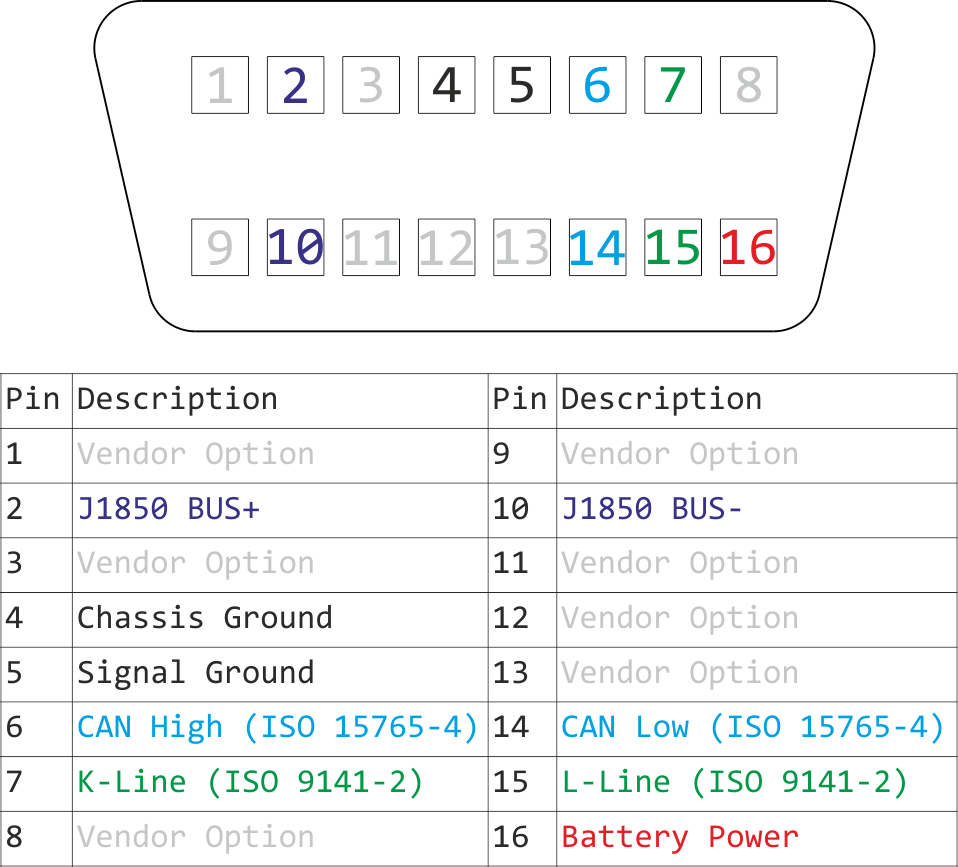
They fooled me! It was supposed to be an extension, but they only did the Bare Minimum! Just checked - it is exactly as in this picture:

Image

None of those Vendor Option pins are connected. So, it is a no-go, I will have to return it and, I think, make my own extension to have 100% certainty.
By the way: I am not so sure shorting pin 4 to pin 5 (so: chassis to signal GND) in the cable (here: "extension") is proper. It should be up to the device connected to take care of that, wouldn't you say?
boosted_diesel
Posts: 663
Joined: Mon Jan 08, 2024 10:41 pm
Vehicle: Mondeo/duratec he/1999cc/2002

Re: MS-CAN inaccessible on Mondeo Mk3 TDCi (ELS27, or vLinker FS USB w/OBD-extension)

Post by boosted_diesel »

pswiatki wrote: Tue Feb 18, 2025 7:22 pm
tractmec wrote: Mon Feb 17, 2025 6:57 pm Next question? Have you continuity checked the extension(Ohm Meter or other continuity device) all pins for no(0) Resistance from pin to socket side, and specifically, Pins 3 and 11(MSCAN pins since that seems to be the problem child here)!
Since you indicated that the vLinker FS seems to work when directly connected to the DLC port then the extension cable would seem to be suspect!
GodDAMMIT!
They fooled me! It was supposed to be an extension, but they only did the Bare Minimum! Just checked - it is exactly as in this picture:

Image

None of those Vendor Option pins are connected. So, it is a no-go, I will have to return it and, I think, make my own extension to have 100% certainty.
By the way: I am not so sure shorting pin 4 to pin 5 (so: chassis to signal GND) in the cable (here: "extension") is proper. It should be up to the device connected to take care of that, wouldn't you say?
Get yourself and obd2 breakout box for like 30, it will act as an extension, is fully pinned, and gives you easy access to all obd circuits which is awesome for problem solving. Mine creates no connectivity issues with any networks and I run a mk3 petrol too myself.
tractmec
Posts: 2109
Joined: Thu May 26, 2016 11:43 pm
Vehicle: F150 5.4 Triton 2005 Fusion 3.0 2010

Re: MS-CAN inaccessible on Mondeo Mk3 TDCi (ELS27, or vLinker FS USB w/OBD-extension)

Post by tractmec »

pswiatki wrote: Tue Feb 18, 2025 7:22 pm
tractmec wrote: Mon Feb 17, 2025 6:57 pm Next question? Have you continuity checked the extension(Ohm Meter or other continuity device) all pins for no(0) Resistance from pin to socket side, and specifically, Pins 3 and 11(MSCAN pins since that seems to be the problem child here)!
Since you indicated that the vLinker FS seems to work when directly connected to the DLC port then the extension cable would seem to be suspect!
GodDAMMIT!
They fooled me! It was supposed to be an extension, but they only did the Bare Minimum! Just checked - it is exactly as in this picture:

Image

None of those Vendor Option pins are connected. So, it is a no-go, I will have to return it and, I think, make my own extension to have 100% certainty.
By the way: I am not so sure shorting pin 4 to pin 5 (so: chassis to signal GND) in the cable (here: "extension") is proper. It should be up to the device connected to take care of that, wouldn't you say?
I Kinda had that suspicion which is why I asked for the Continuity check on Pins 3 and 11 and it looks like all they did was follow the OBDii specs which only calls for PWM/J1850 (Ford calls it SCP) Pins 2 and 10, ISO/Kline pin 7, L Line pin 15(Never seen Ford use that (they did use Pin 3 for the UBP network at one point) and the latest OBDii spec does include HSCAN pin 6 and 14.(notice the period! I generally use the ! to emphasise a point or
a concept and if i get a comment at least I know its was read, not necessarily understood.)

I have never trusted those flat cables in any case. The wire conductors in side the flat insulator are so fine and brittle that they have a nasty habit of breaking the conductors just inside or close to the connector with even a minimum of flexing and not even showing on the outside! So yes make your own if you feel you need one!

The 4-5 ground Pins I have seen either way. My VCM2 has Pins 4 and 5 separated. The two ODBlink Adapters I have(An old ELMscan5 MS switch added) and a wrecked(trying to install the switch) OBD link SX have 4 and 5 common so I do not think that is much of a concern!

You are right though, and I have seen them assigned both ways although officially it seems, Pin 5 is supposed to be assigned to Signal/Logic ground and pin 4 to chassis ground.
In my 05 F150, 03 Expy and 02 Sport Trac, Pins four and five are grounded to separate points on the body but ultimately they are common to the battery negative terminal any way. In my 2010 Fusion they are grounded to the same point on the body so I am expecting that where and how they are grounded was up to just what the engineers happened to like!

Any Way maybe I have been at this too long and just getting old and crotchety! Been pulling wrenches since 1972 most of it self employed, retired in 2017 and I will be 73 in two months.
pswiatki
Posts: 19
Joined: Thu Jun 07, 2018 10:45 pm
Vehicle: Mondeo Mk3 TDCi 2.0 96kW 2006

Re: MS-CAN inaccessible on Mondeo Mk3 TDCi (ELS27, or vLinker FS USB w/OBD-extension)

Post by pswiatki »

Oh, yes. Definitely. I will do that.
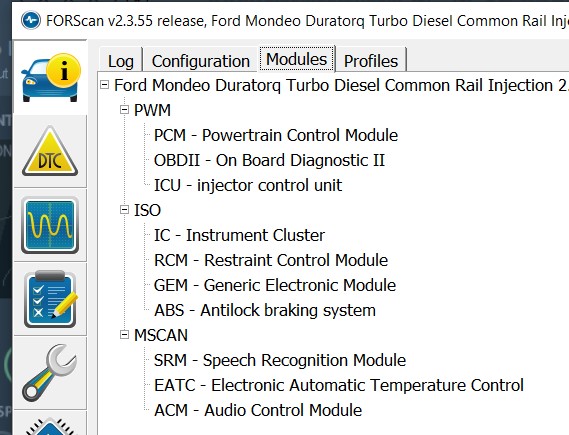
While we're at it - since the ICU as well as PCM are shown in the PWM branch in the diagram (at the top of this thread, first picture), I guess they both communicate using J1850, correct? What is that other branch, ISO? I can see IC, GEM and ABS there. So, are they talking over High Speed CAN (ISO 15765-4, pins 6&14 on the diag connector)?
Asking, because I wonder how much stress there could be on Forscan / OBD diag interface when multiple buses are used at the same time (say: for real-time PID monitoring while the car is in motion). I recall Forscan giving out a warning (that the performance may suffer) if I select PIDs from modules on several different buses at the same time.
tractmec
Posts: 2109
Joined: Thu May 26, 2016 11:43 pm
Vehicle: F150 5.4 Triton 2005 Fusion 3.0 2010

Re: MS-CAN inaccessible on Mondeo Mk3 TDCi (ELS27, or vLinker FS USB w/OBD-extension)

Post by tractmec »

pswiatki wrote: Wed Feb 19, 2025 1:26 am Oh, yes. Definitely. I will do that.
While we're at it - since the ICU as well as PCM are shown in the PWM branch in the diagram (at the top of this thread, first picture), I guess they both communicate using J1850, correct? What is that other branch, ISO? I can see IC, GEM and ABS there. So, are they talking over High Speed CAN (ISO 15765-4, pins 6&14 on the diag connector)?
Asking, because I wonder how much stress there could be on Forscan / OBD diag interface when multiple buses are used at the same time (say: for real-time PID monitoring while the car is in motion). I recall Forscan giving out a warning (that the performance may suffer) if I select PIDs from modules on several different buses at the same time.
No Actually, as going by that image your Mondeo only has One Controller Area Network(CAN) in this case MSCAN(Medium Speed CAN) on Pins 3 and 11(Which is unusual or it would be in N.A. as the 06 Mondeo equivalent here is the 06 Fusion and it is all HSCAN 6 and 14 And MSCAN 3 and 11 and none of the other two, but then this is a Euro market vehicle and I have no data on those).
You have no HSCAN(High Speed CAN) at all on Pins 6 and 14 going by the Module network tab in that image(YourDLC connector will likely not have any sockets in those holes). If it had HSCAN, the PCM and Fuel injection module + the OBDii would normally be on those pins but this vehicle still has the older PWM network, pins 2 and 10 which FORD calls SCP or "Standard Control Protocol"!

The ISO(Fords Designation as the industry calls it K-line or 9141-2) Network is on PIN 7 and is a single line asynchronous(Carries Both Send and Receive data) network and Ford has only used this side of the protocol. I have never seen FORD use the other ISO side 9141-2 or L-Line(Pin15)

To answer your PID question with an "semi educated guess"! What would likely happen if you loaded too many and ran them, at the least you would get freezing or stopping of the live data readings as the data flow catches up or in the extreme cases FORScan will just freeze and you will have to disconnect(Assuming FORScan or the computer has not completely crashed) and close and restart the session again. This will also depend on the computer processing power and memory as well. I doubt there will be any hardware damage if that is what you are concerned about!

If I were going to run Several Module PID's at once I would only chose the particular PID's I felt I needed to monitor not all the PID's in module(The PCM in my Fusion has 400 in read mode) and only those you can fit on a screen(Using the Filter Field could make it easier).

You only have so much Screen real estate in order to view them anyway! The Dash Board Tab Puts each loaded PID in individual cells 4 across and 7 down depending on Screen size.
The Oscilloscope Tab graphs the data but will only show the first 12 PID's loaded again depending on screen size.
The Table will load all the available PID's from a module in Alpha/Numeric form and in live data flow and you can scroll the right hand side scroll bar to view any particular set of PID's. The Other two viewing choices(graph and Cell) are limited to what can fit the screen!

In My experience I have never had an occasion where I felt I needed to do any multiple module Live data PID's at once!
Most of my experience is with the PCM(All PIDs in the table) in live data and that is mostly all my old laptop/Tablet can handle any way!

My 2010 Fusion has about 400 PCM PID's in Read mode and I have run all of them in the Table Tab with no problem on my oldest laptop which is from back in the WinXP days(still Running XP-SP3)!
That same PCM has 42 PID,s that can be run in Control mode(Do not ever run any of these while driving as many of these are not safe) but I have only ever run the one or two of them that were required for a Diagnostic(AWD Engagement as a Example) at the same time!

Don't know if that is an answer to your question or not?
boosted_diesel
Posts: 663
Joined: Mon Jan 08, 2024 10:41 pm
Vehicle: Mondeo/duratec he/1999cc/2002

Re: MS-CAN inaccessible on Mondeo Mk3 TDCi (ELS27, or vLinker FS USB w/OBD-extension)

Post by boosted_diesel »

tractmec wrote: Wed Feb 19, 2025 10:51 pm
pswiatki wrote: Wed Feb 19, 2025 1:26 am Oh, yes. Definitely. I will do that.
While we're at it - since the ICU as well as PCM are shown in the PWM branch in the diagram (at the top of this thread, first picture), I guess they both communicate using J1850, correct? What is that other branch, ISO? I can see IC, GEM and ABS there. So, are they talking over High Speed CAN (ISO 15765-4, pins 6&14 on the diag connector)?
Asking, because I wonder how much stress there could be on Forscan / OBD diag interface when multiple buses are used at the same time (say: for real-time PID monitoring while the car is in motion). I recall Forscan giving out a warning (that the performance may suffer) if I select PIDs from modules on several different buses at the same time.
No Actually, as going by that image your Mondeo only has One Controller Area Network(CAN) in this case MSCAN(Medium Speed CAN) on Pins 3 and 11(Which is unusual or it would be in N.A. as the 06 Mondeo equivalent here is the 06 Fusion and it is all HSCAN 6 and 14 And MSCAN 3 and 11 and none of the other two, but then this is a Euro market vehicle and I have no data on those).
You have no HSCAN(High Speed CAN) at all on Pins 6 and 14 going by the Module network tab in that image(YourDLC connector will likely not have any sockets in those holes). If it had HSCAN, the PCM and Fuel injection module + the OBDii would normally be on those pins but this vehicle still has the older PWM network, pins 2 and 10 which FORD calls SCP or "Standard Control Protocol"!

The ISO(Fords Designation as the industry calls it K-line or 9141-2) Network is on PIN 7 and is a single line asynchronous(Carries Both Send and Receive data) network and Ford has only used this side of the protocol. I have never seen FORD use the other ISO side 9141-2 or L-Line(Pin15)

To answer your PID question with an "semi educated guess"! What would likely happen if you loaded too many and ran them, at the least you would get freezing or stopping of the live data readings as the data flow catches up or in the extreme cases FORScan will just freeze and you will have to disconnect(Assuming FORScan or the computer has not completely crashed) and close and restart the session again. This will also depend on the computer processing power and memory as well. I doubt there will be any hardware damage if that is what you are concerned about!

If I were going to run Several Module PID's at once I would only chose the particular PID's I felt I needed to monitor not all the PID's in module(The PCM in my Fusion has 400 in read mode) and only those you can fit on a screen(Using the Filter Field could make it easier).

You only have so much Screen real estate in order to view them anyway! The Dash Board Tab Puts each loaded PID in individual cells 4 across and 7 down depending on Screen size.
The Oscilloscope Tab graphs the data but will only show the first 12 PID's loaded again depending on screen size.
The Table will load all the available PID's from a module in Alpha/Numeric form and in live data flow and you can scroll the right hand side scroll bar to view any particular set of PID's. The Other two viewing choices(graph and Cell) are limited to what can fit the screen!

In My experience I have never had an occasion where I felt I needed to do any multiple module Live data PID's at once!
Most of my experience is with the PCM(All PIDs in the table) in live data and that is mostly all my old laptop/Tablet can handle any way!

My 2010 Fusion has about 400 PCM PID's in Read mode and I have run all of them in the Table Tab with no problem on my oldest laptop which is from back in the WinXP days(still Running XP-SP3)!
That same PCM has 42 PID,s that can be run in Control mode(Do not ever run any of these while driving as many of these are not safe) but I have only ever run the one or two of them that were required for a Diagnostic(AWD Engagement as a Example) at the same time!

Don't know if that is an answer to your question or not?
If we know the engine code and year I have the diagrams for the dlc and can network for this car
Post Reply