FORScan wrote: Sat Jun 21, 2014 11:28 am
Procedure for other adapters should be simiar, although Web interface, credentials etc may differ.
For what is worth, looks like this parameter can also be changed in specific devices through WiFi using AT commands (AT+UARTFT or AT+UARTTE, didn't test it, though). Please, read the technical details at the bottom.
In addition, I've been able to set my ELM327 WIFI OBD2 device to be in both AP (access point or hotspot) mode and client (station) mode at the same time.
This means that now I can have both the OBD device and the head-unit connecting to my phone hotspot, so I can have torque on the head-unit and still have internet connection if needed.
 ---------- Technical details, for those who may be interested ----------
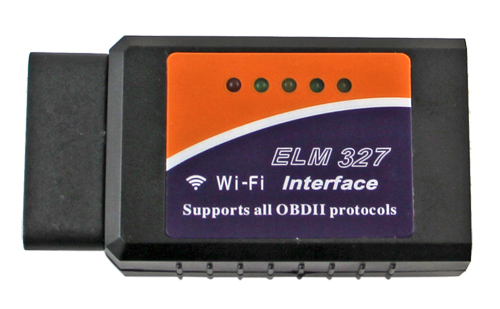
I've purchased a couple of ELM327 WiFi OBD2 devices from Amazon. Specifically:
MotoDia B1 OBD2 --> Doesn't listen on udp/8899 or udp/48899 for WiFi config.
Vgate iCar Pro Wi-Fi OBD2 --> Listens on udp/48899.
Even if the second is almost twice the price, I recommend it because it's much smaller and the OBD port will suffer less. I will be returning the first one.
The good news is that the settings mentioned in the original post can also be reconfigured through a virtual serial port which is exposed over a TCP port in specific OBD2 adapters.
To avoid extending the post too much,
I'm leaving here an Android app that can be used to send such commands and the user manual for the ELM327 WiFi devices, which explains all available commands. Short description of commands at the bottom.
I guess this commands can also be sent with other terminal apps, like telnet, PuTTY or HyperTerminal.
In addition, I'm leaving here a couple of articles which explain how to configure the device into APSTA mode (mixed AP and station mode), change the config for both SSIDs and send other commands through the virtual serial port.
Configure AP (hotspot) mode:
Original /
Translated
Configure station (client) mode:
Original /
Translated
Leaving here below the sequence to communicate with this adapters over udp/48899 or udp/8899.
- There are several UDP Terminal applications on Google Play Store, besides of the WiFi config tool above (but that one only communicates on port udp/48899).
- Commands must not include neither newline or carriage return at the end.
Client: HF-A11ASSISTHREAD
Reply: 10.42.0.95,[MACAddress],HF-LPT230
Client: +ok
Client: AT+
Reply: +ERR=-1
Available commands for VGate iCar Pro WiFi (other adapters may have different commands, use AT+H to learn):
Code: Select all
    AT+H:      Show this help.
    AT+TYPE: airkiss device type.
    AT+APPVER: get version
    AT+TMODE: Set/Get the UART work mode.
    AT+ENTM: Goto Through MOde.
    AT+UART: Set/Get the UART0/UART1 Parameters.
    AT+WSMAC: Set/Get Module MAC Address.
    AT+WAMAC: Get Module MAC Address in AP mode.
    AT+NDBGL:set/get debug level
    AT+RELD: Reload the default setting and reboot.
    AT+RLDEN: Put on/off the Reload Pin.
    AT+MID: Get The Module ID.
    AT+WRMID: Write Module ID.
    AT+ASWD: Set/Query WiFi configuration code.
    AT+VER:Get application version.
    AT+BVER: Get bootloader version.
    AT+HWVER:Get hardware version.
    AT+FCLR: Clear Fsetting.
    AT+CFGRD: Get current system config.
    AT+CFGTF: Save Current Config to Default Config.
    AT+SMEM:show system memory stat
    AT+OTA:OTA
    AT+UPURL: Set/Get the path of remote upgrade.
    AT+CMDPW: Set/Get cmd password in throuphput mode.
    AT+UID: Set/Get UID.
    AT+E: Echo ON/Off, to turn on/off command line echo function.
    AT+Z: Reset the Module.
    AT+SRST:Soft Reset the Module.
    AT+H:show help
    AT+NETP: Set/Get the Net Protocol Parameters.
    AT+TCPLK: Get The state of TCP link.
    AT+TCPTO: Set/Get TCP time out.
    AT+TCPDIS: Connect/Dis-connect the TCP Client link
    AT+MAXSK: Set/Get MAX num of TCP socket (1~5)
    AT+RCV: Recv data from socket_a
    AT+SEND: Send data to socket_a
    AT+SOCKB: Set/Get Parameters of socket_b.
    AT+TCPLKB: Get The state of TCP_B link.
    AT+TCPTOB: Set/Get TCP_B time out.
    AT+TCPDISB: Connect/Dis-connect the TCP_B Client link.
    AT+RCVB: Recv data from socket_b
    AT+SNDB: Send data to socket_b
    AT+WMODE: Set/Get the WIFI Operation Mode (AP or STA).
    AT+WSSSID: Set/Get the AP's SSID of WIFI STA Mode.
    AT+WSKEY: Set/Get the Security Parameters of WIFI STA Mode.
    AT+WSLK: Get Link Status of the Module (Only for STA Mode).
    AT+WSLQ: Get Link Quality of the Module (Only for STA Mode).
    AT+WAP: Set/Get the AP parameters.
    AT+WAKEY: Set/Get the Security Parameters of WIFI AP Mode.
    AT+WALK:Show sta information of AP connection.
    AT+WALKIND:enable/disable LED indication of AP connection.
    AT+WAPMXSTA: Set/Get the Max Number Of Sta Connected to Ap.
    AT+WSCAN: Get The AP site Survey (only for STA Mode).
    AT+SMTLK: Start Smart Configuration.
    AT+SMTLKST=mode,protocol: Setup smartlnk mode and protocol.
    AT+SMARTAPCONFIG: Enable/disable smart AP config function.
    AT+SMARTAPSTART: Start smart AP config function.
    AT+WPS: Start WPS.
    AT+DISPS: Disable power saving mode of WIFI
    AT+WIFI=UP/DOWN: Power down or up  the wifi chip.
    AT+MDCH: Put on/off automatic switching WIFI mode.
    AT+WSLKO: Enable/Disable connect router with the best signal.
    AT+UDPLCPT: Set/Get local UDP port.
    AT+PING: General PING command.
    AT+WANN: Set/Get The WAN setting if in STA mode.
    AT+LANN: Set/Get The LAN setting if in ADHOC mode.
    AT+WADHCP:enable/disable AP dhcp server and set ip address pool
    AT+WEBU: Set/Get the Login Parameters of WEB page.
    AT+PLANG=EN/CN: Set/Get the language of WEB page.
    AT+WSDNS: Set/Get the DNS Server address.
    AT+NTPEN: Enable/Disable NTP Server.
    AT+NTPRF: Set/Query NTP.
    AT+NTPTM: Set/Query Ntp Time.
    AT+NTPSER: Set/Query Ntp Server.
    AT+TXPWR: Set/Get wifi rf tx power.
    AT+RFTESTMODE: RF test mode ON/OFF.