Page 1 of 1
Silent Mode Menu Control 2020 F250
Posted: Tue Jan 18, 2022 12:39 am
by RLGriff
Hi All,
Is there an option to have silent mode be a menu option on a 2020 F250? It appears to be an option on the 2019+ ranger, but I can't find anything for the f250/f350.
I do have the option for silent mode and dark car and they work, but it's an all or nothing. I'd like to be able to switch it from the menu controls and not have to use Forscan to switch back and forth. Any help is greatly appreciated!
Re: Silent Mode Menu Control 2020 F250
Posted: Fri Jan 21, 2022 3:45 pm
by PlatinumOwner
Can you post your IPC as-built line 720-32-01 and BCM line 726-58-02?
Re: Silent Mode Menu Control 2020 F250
Posted: Fri Jan 21, 2022 3:48 pm
by PlatinumOwner
Are you running Sync 3.4? If so & your APIM has a newer firmware, it possible to enable Silent Mode control through the APIM by activating center stack settings and silent mode control. This option will be added in Settings > Vehicle Settings.

Re: Silent Mode Menu Control 2020 F250
Posted: Fri Jan 21, 2022 11:49 pm
by RLGriff
PlatinumOwner wrote: Fri Jan 21, 2022 3:45 pm
Can you post your IPC as-built line 720-32-01 and BCM line 726-58-02?
My highest IPC as-built line is 720-10-02
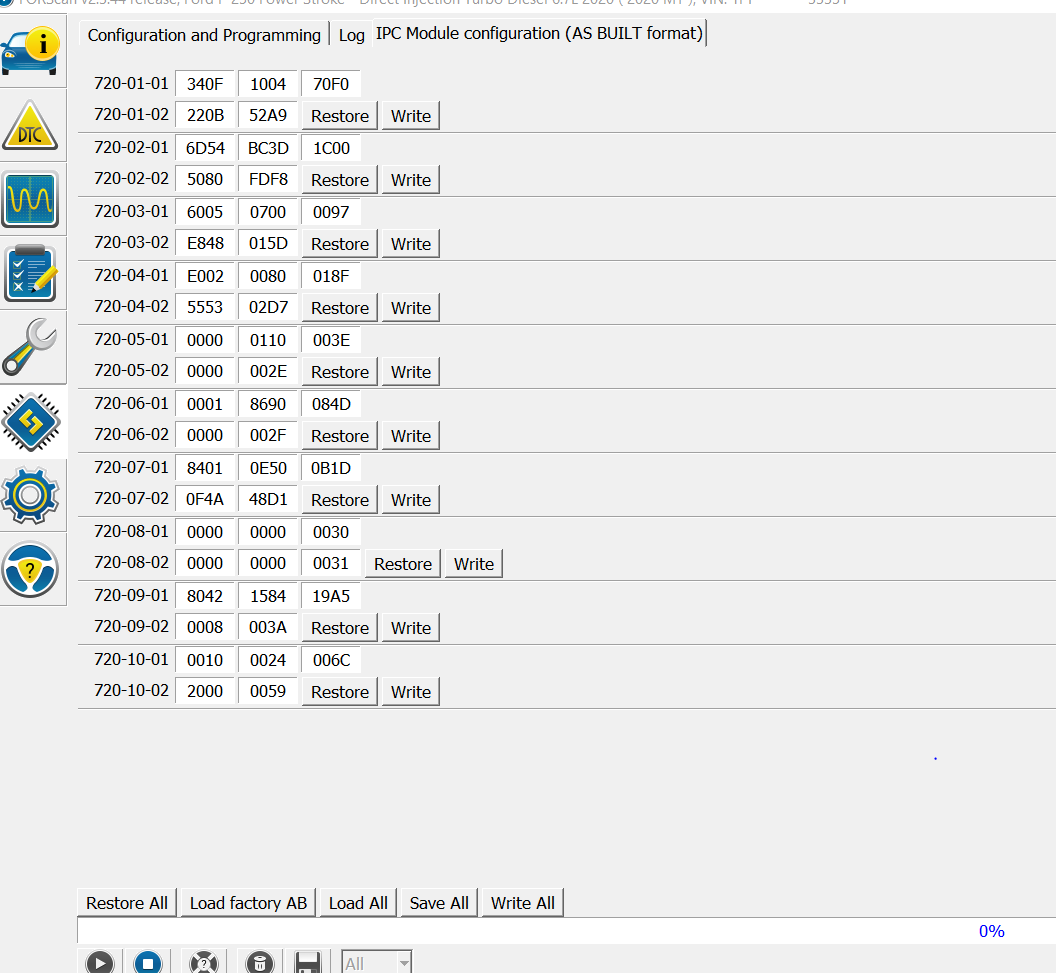
- Capture.PNG (79.21 KiB) Viewed 5150 times
MY BCM as built lline 726-58-02: 0000 0004 008B
Re: Silent Mode Menu Control 2020 F250
Posted: Fri Jan 21, 2022 11:54 pm
by RLGriff
PlatinumOwner wrote: Fri Jan 21, 2022 3:48 pm
Are you running Sync 3.4? If so & your APIM has a newer firmware, it possible to enable Silent Mode control through the APIM by activating center stack settings and silent mode control. This option will be added in Settings > Vehicle Settings.
This did it! Thank you!
Re: Silent Mode Menu Control 2020 F250
Posted: Sat Jan 22, 2022 12:04 am
by PlatinumOwner
I'm not sure if this IPC will support it but try
720-04-01 E006 0080
Re: Silent Mode Menu Control 2020 F250
Posted: Sat Jan 22, 2022 12:07 am
by PlatinumOwner
RLGriff wrote: Fri Jan 21, 2022 11:54 pm
PlatinumOwner wrote: Fri Jan 21, 2022 3:48 pm
Are you running Sync 3.4? If so & your APIM has a newer firmware, it possible to enable Silent Mode control through the APIM by activating center stack settings and silent mode control. This option will be added in Settings > Vehicle Settings.
This did it! Thank you!
Great! I added a code above to try for IPC control as well.
Re: Silent Mode Menu Control 2020 F250
Posted: Sat Jan 22, 2022 12:10 am
by RLGriff
PlatinumOwner wrote: Sat Jan 22, 2022 12:04 am
I'm not sure if this IPC will support it but try
720-04-01 E006 0080
I have the extended license and going into the plain english APIM, I enabled center stack controls and silent mode control. That then gave the option you have in your screenshot. Click it on and all lights stay off, perimeter and interior (except for sync screen which is fine). Click it back off and the christmas tree of lights is reactivated.
This way works great for me to leave the lights on to get kiddos in and out of the truck daily, but when I'm hunting or camping, I can turn off the lights without using forscan.
Thank you again for the help. I very much appreciate it!
Re: Silent Mode Menu Control 2020 F250
Posted: Tue Jun 21, 2022 3:29 am
by mtech
What version of APIM firmware are people running to get the centerstack settings? I have a 2018, upgraded to sync 3.4, but I cannot enable the silent mode setting in my apim because mine does not go high enough. And, it appears like my IPC does not support showing this option.