Page 1 of 1
How to run FORScan on Windows computer with ARM CPU
Posted: Sat Sep 28, 2024 1:21 pm
by FORScan
The 3rd pary protection/licensing system used by FORScan doesn't work properly on Windows 10/11 laptops with ARM CPU. By default, FORScan cannot be ran on such computer (nothing happens when user clicks on the FORScan icon), or some weird error window is displayed:
So how to fix:
1. Right mouse click on the FORScan icon and select Properties in the popup menu:
2. In the window opened select Compatibility tab, then find and press the "Change emulation Settings" button there:
3. In the dialog opened select "Safe emulation":
4. Press OK to close the dialog, press Apply to close the parent window.
Thanks to George Humphrey who developed this guide.
Re: How to run FORScan on Windows computer with ARM CPU
Posted: Mon Oct 21, 2024 4:34 am
by twisterrescue
Thank you great info .can you please reset my beta tester extended lic. it quit working the other day ! twisterrescue
Re: How to run FORScan on Windows computer with ARM CPU
Posted: Mon Nov 11, 2024 12:56 am
by GHum7771
I’m glad I could help.
Re: How to run FORScan on Windows computer with ARM CPU
Posted: Sun Dec 08, 2024 6:19 pm
by mrc1986
also if you are having issues with your vlinker usb drivers on windows 11 ARM
Use these drivers and the device will be able to connect, the ones vlinker give on their website are only for normal versions of windows and won't be recognised.
https://ftdichip.com/wp-content/uploads ... utable.zip
Re: How to run FORScan on Windows computer with ARM CPU
Posted: Fri Jan 17, 2025 5:40 pm
by sragsdill
I need help getting Forscan to open.
Using Windows 11 via VMWare Fusion on M3 Macbook.
Windows 11 is up to date.
Forscan V2.3.64 installed.
Emulation set to safe as recommended above.
The blue ring spins for a few seconds, then nothing.
Re: How to run FORScan on Windows computer with ARM CPU
Posted: Mon Jan 20, 2025 7:14 am
by oldtinfords
sragsdill wrote: Fri Jan 17, 2025 5:40 pm
I need help getting Forscan to open.
Using Windows 11 via VMWare Fusion on M3 Macbook.
Windows 11 is up to date.
Forscan V2.3.64 installed.
Emulation set to safe as recommended above.
The blue ring spins for a few seconds, then nothing.
Uninstall, reboot & reinstall. Follow the instructions above before trying to run FORScan.
Re: How to run FORScan on Windows computer with ARM CPU
Posted: Tue Jan 21, 2025 5:12 pm
by KazWolfe
For anyone still having difficulty, try setting the application to use only a single core for emulation:
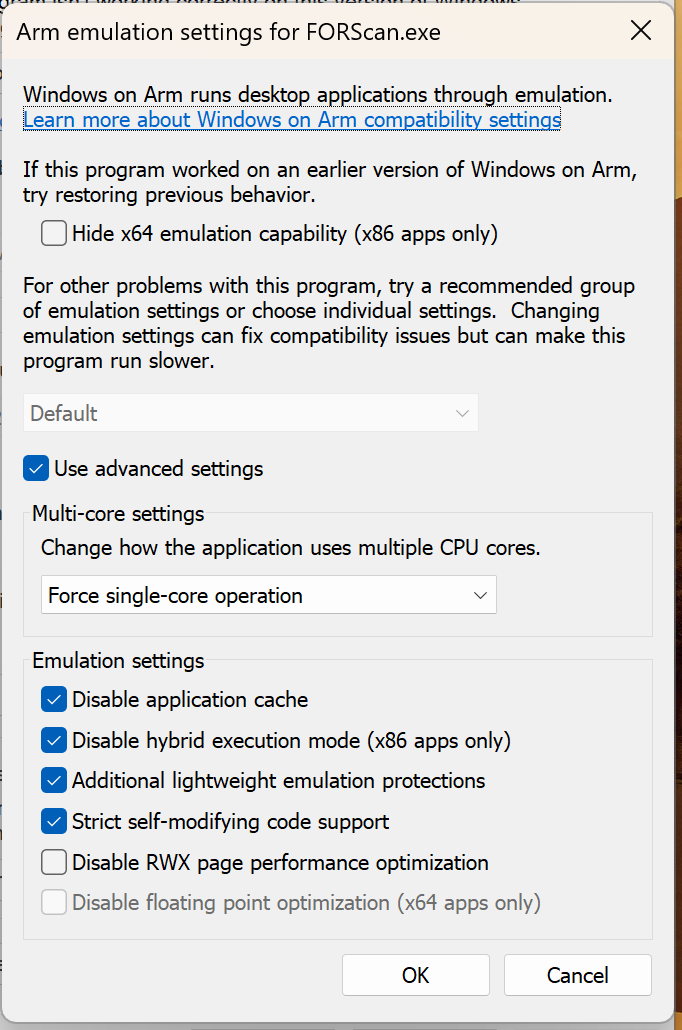
- Screenshot 2025-01-21 at 09.11.31.png (123.76 KiB) Viewed 13003 times
I can report success with these settings on an M4 Max, macOS 15.1.1, VMWare Fusion 13.6.2, Windows 11 guest.
Re: How to run FORScan on Windows computer with ARM CPU
Posted: Fri Jan 24, 2025 9:33 pm
by sragsdill
Thank you KazWolfe that did the trick!
Re: How to run FORScan on Windows computer with ARM CPU
Posted: Tue Jan 13, 2026 12:13 am
by found
Would appreciate if anyone who is running FORScan on a ARM Snapdragon processor could advise how their system is preforming.
Also if possible advise how stable it is and what FORscan test functions they use it if for.
Thanks in advance, I appreciate your time
Re: How to run FORScan on Windows computer with ARM CPU
Posted: Tue Jan 13, 2026 3:38 am
by BUGGIE_X
Finally I found this, Thanks KazWolfe , now it's working again at my MacBook Pro running windows 11 pro thru parallels..... thanks..


