Bump
I'm also missing the DDM and possibly other modules in the FORScan Windows application v 2.3.10.
The OBDII adapter has a switch, and FORScan asks me to switch it back and forth when initializing the connection with my 2017 Explorer XLT.
Does anyone know what's going on?
FORScan support has confirmed that "FORScan does support HS2/HS3 CAN starting from v2.2.4" (http://forscan.org/forum/viewtopic.php? ... sion#p8536).
I'm seeing all the different buses HS,HS2,HS3,MS, it doesn't appear to be an issue with the adapter.
Missing DDM & PDM Modules - 2017 Raptor / OBDLink MX
Re: Missing DDM & PDM Modules - 2017 Raptor / OBDLink MX
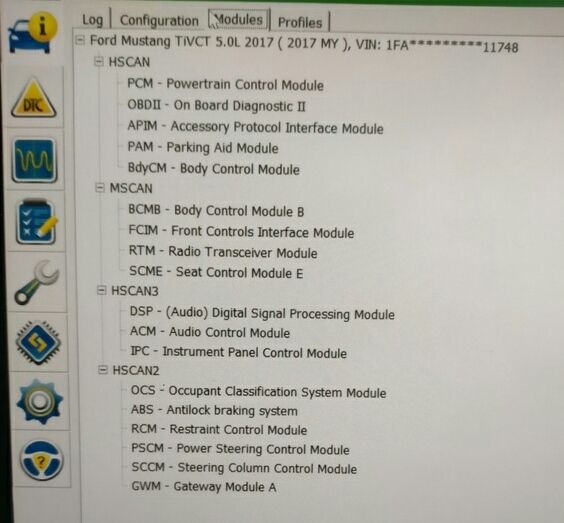
On the mustang I too cannot see the DDM/PDM modules I have a USB Elm327 with a switch it shows MS Can where they should be but do not turn up any advice?
-
okgearhead
- Posts: 6
- Joined: Sat Jun 03, 2017 7:58 pm
- Vehicle: 2017 Ford Expedition EL 4X4
- Location: Bixby, Ok.
Re: Missing DDM & PDM Modules - 2017 Raptor / OBDLink MX
just to find out what modules you have, you need a Module Build Data ( As Built ) sheet, do a search for it on this forum, you'll need your Vin #, it'll tell you the modules you have.
Re: Missing DDM & PDM Modules - 2017 Raptor / OBDLink MX
I've just done that and apparently my vehicle doesn't have 740- code string for the DDM and PDM modules...
Is there any where else these codes would be in place of? I'm sure the coding for the doors has got to be there somewhere!
Is there any where else these codes would be in place of? I'm sure the coding for the doors has got to be there somewhere!
Re: Missing DDM & PDM Modules - 2017 Raptor / OBDLink MX
Has anyone had any luck with the DDM module?
-
Rocketcali90
- Posts: 1
- Joined: Tue Dec 25, 2018 4:32 pm
- Vehicle: 2017 Ford Explorer XLT
Re: Missing DDM & PDM Modules - 2017 Raptor / OBDLink MX
Anyone find a solution to this....I'm also having this problem 
Re: Missing DDM & PDM Modules - 2017 Raptor / OBDLink MX
On my 2018 F150 I deleted my trucks profile on Forscan and had it rebuild it and the DDM and many other modules now appear.
Re: Missing DDM & PDM Modules - 2017 Raptor / OBDLink MX
Hi guys,
I have the same problem on a 2009 Fiesta. I would like to enable global open / close, but DDM and PDM doesn't appear.
I have this device from Amazon:
https://www.amazon.de/gp/product/B06XJ6 ... UTF8&psc=1
I could already enable cruise control, so it's working, but my module list is VERY small:


Is this because my cable doesn't support all modules, or because I don't have those in my car?
I have the same problem on a 2009 Fiesta. I would like to enable global open / close, but DDM and PDM doesn't appear.
I have this device from Amazon:
https://www.amazon.de/gp/product/B06XJ6 ... UTF8&psc=1
I could already enable cruise control, so it's working, but my module list is VERY small:
Is this because my cable doesn't support all modules, or because I don't have those in my car?
Re: Missing DDM & PDM Modules - 2017 Raptor / OBDLink MX
Can you elaborate on what procedure you took to find this? I have a 2019 Expedition Plat. and currently, with the latest version of Forscan, I don't have DDM/PDM, and would really like to do the lincoln style mirrors. Anyone have any thoughts here? Been able to do this?kirkc wrote: Mon Jul 01, 2019 12:18 am On my 2018 F150 I deleted my trucks profile on Forscan and had it rebuild it and the DDM and many other modules now appear.
Re: Missing DDM & PDM Modules - 2017 Raptor / OBDLink MX
At the very bottom of the Forscan instructions page here:
https://docs.google.com/document/d/1-8d ... xIqxY/edit
at the bottom of the FAQ section is the procedure for initially scanning for modules. You should delete your vehicle profile that isn't showing all of the modules and let it recreate them following these directions in the link.
https://docs.google.com/document/d/1-8d ... xIqxY/edit
at the bottom of the FAQ section is the procedure for initially scanning for modules. You should delete your vehicle profile that isn't showing all of the modules and let it recreate them following these directions in the link.
Last edited by cdodgela on Sat Jan 18, 2020 2:09 pm, edited 1 time in total.