These are the missing "unknown" tests from FORScan, the Mitchell J2534 correctly reports them. Correct test data pids Pls update these in FORScanjSONBB wrote: Thu Jan 05, 2023 8:50 pm nonContinuousModeDetailedReport_2002__Ford__Escape__GLOBAL_OBDII__01052023152506.pdf
Report of non Continuous DTCs as reported by the Mitchell MD-350. FORScan does not know what multiples of these tests are - gives incorrect data output. I will update this with the list of DTCs from FORScan later today for comparison.
Support of J2534 (Pass-Thru) adapters in FORScan v2.2.*
Re: Support of J2534 (Pass-Thru) adapters in FORScan v2.2.*
I do understand how to operate this tool, I am trying to show comparison for test data that FORScan doesn't understand; as it shows "unknown" in the Mode 6 list.Ecmbuster wrote: Sun Jan 08, 2023 1:24 amThis is how MODE 6 is identified with FORScan with a J2534-2 device and Bluetooth adapter.jSONBB wrote: Thu Jan 05, 2023 8:50 pm nonContinuousModeDetailedReport_2002__Ford__Escape__GLOBAL_OBDII__01052023152506.pdf
Report of non Continuous DTCs as reported by the Mitchell MD-350. FORScan does not know what multiples of these tests are - gives incorrect data output. I will update this with the list of DTCs from FORScan later today for comparison.
You are incorrect trying to operate that tool, all it did is generate a report from itself, NOT FORScan!
Misfire mode6.jpg
-
Ecmbuster
- Posts: 2433
- Joined: Sun Mar 15, 2015 4:08 am
- Vehicle: Subaru, Volvo Bertone and two Motorcycles
- Location: On a spinning rock
Re: Support of J2534 (Pass-Thru) adapters in FORScan v2.2.*
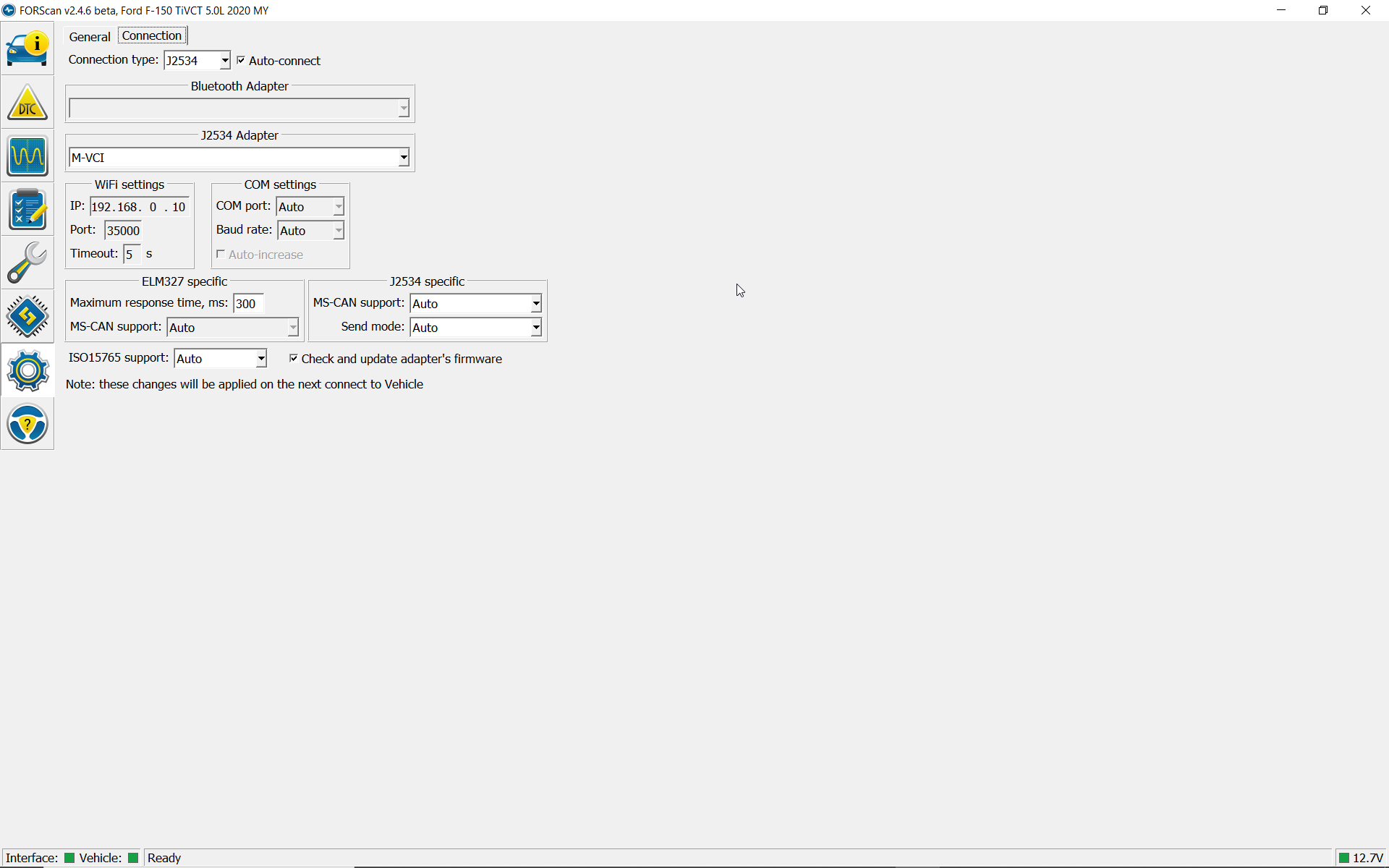
Bosch M-VCI (Mastertech)
https://www.boschdiagnostics.com/softwa ... osch-m-vci
Install Windows 7
1) M-VCI_Setup_v13.2.6.exe
2) M-VCI_Setup_v13.3.18.exe
Go to C:\Program Files (x86)\Bosch\VTX-VCI\VCI Software (M-VCI)\J2534 Configuration
Send J2534ConfigApp.exe to desktop
Install Windows 10
Use compatability mode for Windows 7 for both files
1) M-VCI_Setup_v13.2.6.exe
2) M-VCI_Setup_v13.3.18.exe
Go to C:\Program Files (x86)\Bosch\VTX-VCI\VCI Software (M-VCI)\J2534 Configuration
Send J2534ConfigApp.exe to desktop
Use the USB connection NOT WiFi for diagnostics and programming.
All other applications will be on the desktop - Success with a 2020 F150 5.0L 4WD
https://www.boschdiagnostics.com/softwa ... osch-m-vci
Install Windows 7
1) M-VCI_Setup_v13.2.6.exe
2) M-VCI_Setup_v13.3.18.exe
Go to C:\Program Files (x86)\Bosch\VTX-VCI\VCI Software (M-VCI)\J2534 Configuration
Send J2534ConfigApp.exe to desktop
Install Windows 10
Use compatability mode for Windows 7 for both files
1) M-VCI_Setup_v13.2.6.exe
2) M-VCI_Setup_v13.3.18.exe
Go to C:\Program Files (x86)\Bosch\VTX-VCI\VCI Software (M-VCI)\J2534 Configuration
Send J2534ConfigApp.exe to desktop
Use the USB connection NOT WiFi for diagnostics and programming.
All other applications will be on the desktop - Success with a 2020 F150 5.0L 4WD
Do not ask for help in PM. Use the forum to ask and answer questions! There's a special place for NOT following up!
Re: Support of J2534 (Pass-Thru) adapters in FORScan v2.2.*
I can't program the BCMI Ford Focus MK 3.5 with the original UCDS cable. Message: the cable is not suitable. Everything worked last week.
I use: Forscan, IDS, FDRS, UCDS, Fordiag
-
stimpy88
- Posts: 165
- Joined: Wed Sep 09, 2015 9:28 am
- Vehicle: Ford Mondeo Mk5 - Diesel 2.0, 150, 2017
Re: Support of J2534 (Pass-Thru) adapters in FORScan v2.2.*
Isn't UCDS basically ransomware now? Maybe your cable "phoned home"? I hear they no longer sell tokens or hardware, yet they don't unlock the software.
We always said UCDS was a nasty business model that leaves you at the mercy of the developer and their shady token based system.
Re: Support of J2534 (Pass-Thru) adapters in FORScan v2.2.*
I have been using UCDS for more than two years now and i never had an issue with,all you have is connecte it to internet once a week to activate the license,Ford softwares IDS,FDRS,FJDS use the same system to be activated and the license is specific to one laptop,Forscan uses two months free license or one year payed one,all these softwares are complimentary ones at list forIDS Forscan and UCDS for diagnosis,modules programming and updates and you need to use all of them some times when the vehicle is 2018 or older,both Forscan and UCDS dont have the ability to program PATS for 2011 and newer cars,concerning the tokens,i have never used the ones i have yet.
Re: Support of J2534 (Pass-Thru) adapters in FORScan v2.2.*
Same problem with the original VCM-II and VCM-3...
-
tractmec
- Posts: 2109
- Joined: Thu May 26, 2016 11:43 pm
- Vehicle: F150 5.4 Triton 2005 Fusion 3.0 2010
Re: Support of J2534 (Pass-Thru) adapters in FORScan v2.2.*
Use the Support instructions at the heading "Providing FORScan Debug Information" at this link https://forscan.org/contactus.html!
-
guangzhouhuakai
- Posts: 34
- Joined: Tue Dec 14, 2021 12:56 am
- Vehicle: ford F550 7.3L 2020
- Location: california
Re: Support of J2534 (Pass-Thru) adapters in FORScan v2.2.*
I use a J2534 CarDaq Plus 2 to connect to a 2020-2022 Ford Transit, the F550 works fine and is fast, scans all the modules within 10 seconds, but the CarDaq Plus 2 is too expensive and costs almost $1500; if only one It is recommended to use OBDLINK EX for a Ford car, which is economical and fast;FORScan wrote: Tue Mar 17, 2015 4:14 amFORScan should work with any J2534 devices, so if all the above devices support J2534, FORScan should be able to work with all of them. CarDaq Plus is some kind of ethalon for J2534, however this tool is quite expensive so we had no chance to obtain it for testing. We would be glad to get a confirmation it works. As for the other devices, it would be interesting to get the tests results too.Ecmbuster wrote: CarDaq Plus
Vetronix ES6510 (working with Ford VODU)
DrewTech Mongoose MFC (may not work with all Ford models)
Actia XS
福特进无止境