Page 2 of 3
Re: TCU Firmware Update Failing
Posted: Mon Nov 21, 2022 5:07 pm
by fordsmax471
elpamyelhsa wrote: Mon Nov 21, 2022 12:55 pm
While I have tried restoring it a few times it does keep failing with the same error after about 9min of erasing,
It looks like another SBL existed for it that may help, any chance someone has "LL5T-14G141-BC.vbf" SBL file laying around or any SBL 14G141 starting with LL5T, LV4T or LB5T?
LL5T-14G141-BC.vbf not ok
LV5T-14G141-BC.vbf not ok
LB5T-14G141-BC.vbf ok
Re: TCU Firmware Update Failing
Posted: Mon Nov 21, 2022 5:13 pm
by fordsmax471
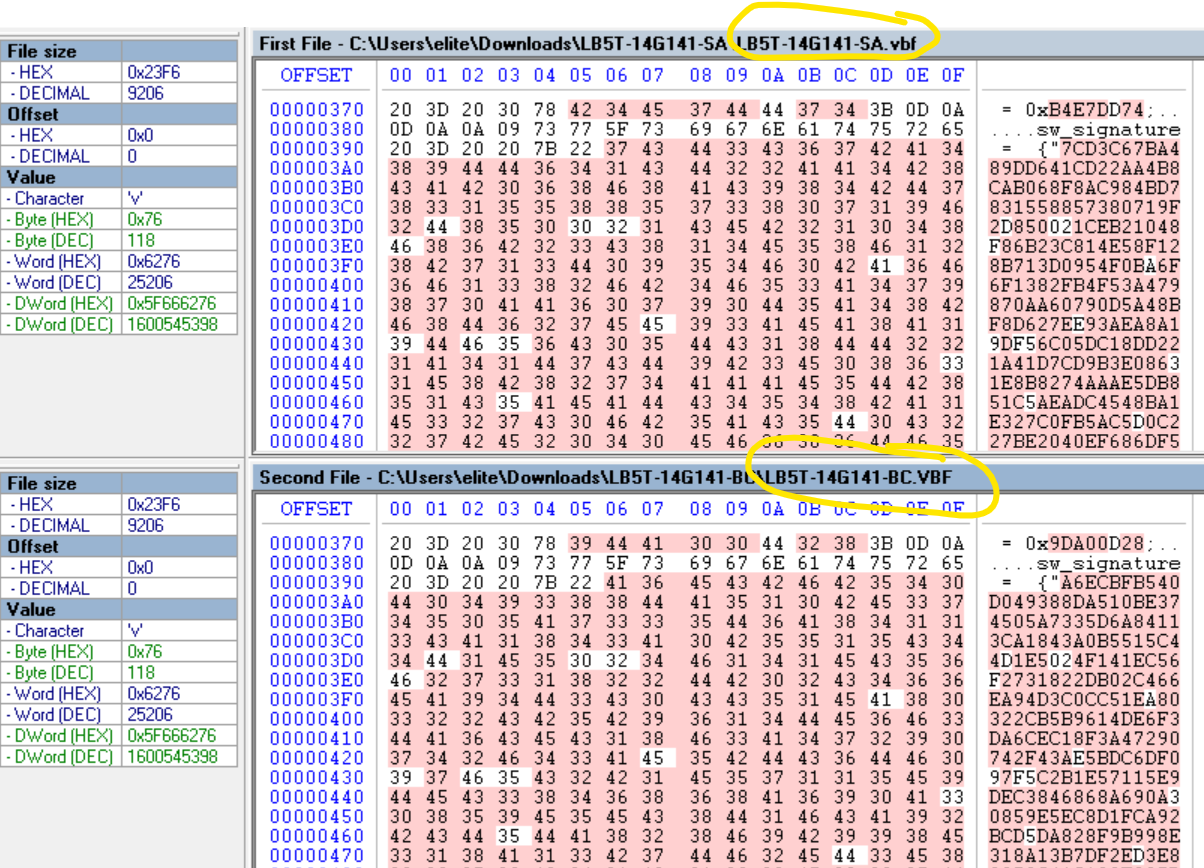
- 1.png (214.19 KiB) Viewed 7031 times

- 2.png (12.18 KiB) Viewed 7031 times
Re: TCU Firmware Update Failing
Posted: Wed Nov 23, 2022 7:15 pm
by avdonr
Thought I’d chime in to say I am facing the same issue on my TCU. Tried to upgrade an H-series TCU from the stock -UF config to the latest -UP config so that I could retrofit it into my parents 2018 Fusion.
I even tried programming via FJDS but it seems that it crashes upon downloading/validating the VBFs so not sure what’s up with that.
Currently am in the same state as OP. Module comes up on the network but is unable to be communicated with. FORScan can’t read firmware versions, DTCs or as built.
I am using the -SA SBL from the H-series, which appears to be the only version available.
Any further troubleshooting or flashing advice would be very much appreciated!
Re: TCU Firmware Update Failing
Posted: Wed Nov 23, 2022 11:36 pm
by elpamyelhsa
FORScan support have been offering some help and we are hoping to try some more things over the next few days. Ill be sure to update this post with any progress. Can you confirm if you are getting the update fail at the same stage as me (Erasing block 2/2)?
Re: TCU Firmware Update Failing
Posted: Thu Nov 24, 2022 8:34 pm
by avdonr
Thank you very much, appreciate any help or steps from the FORScan team to try and get this resolved for the both of us.
I can confirm that I was stuck at the same stage as you, "erasing blocks failed" message after step "erasing block 2/2". I tried re-programming the module with -UF (stock firmware it came with), -UM and -UP with no luck on any. The first firmware I tried to upgrade to was the latest one available in FORScan (-UP) and after that it appeared to be in a "bricked" state. It comes up on the vehicle's HS3 network, but I am unable to run a self-test or communicate with it in any way. Loading/reading as-built also does not work.
These are the options I am using/attempting to program with:
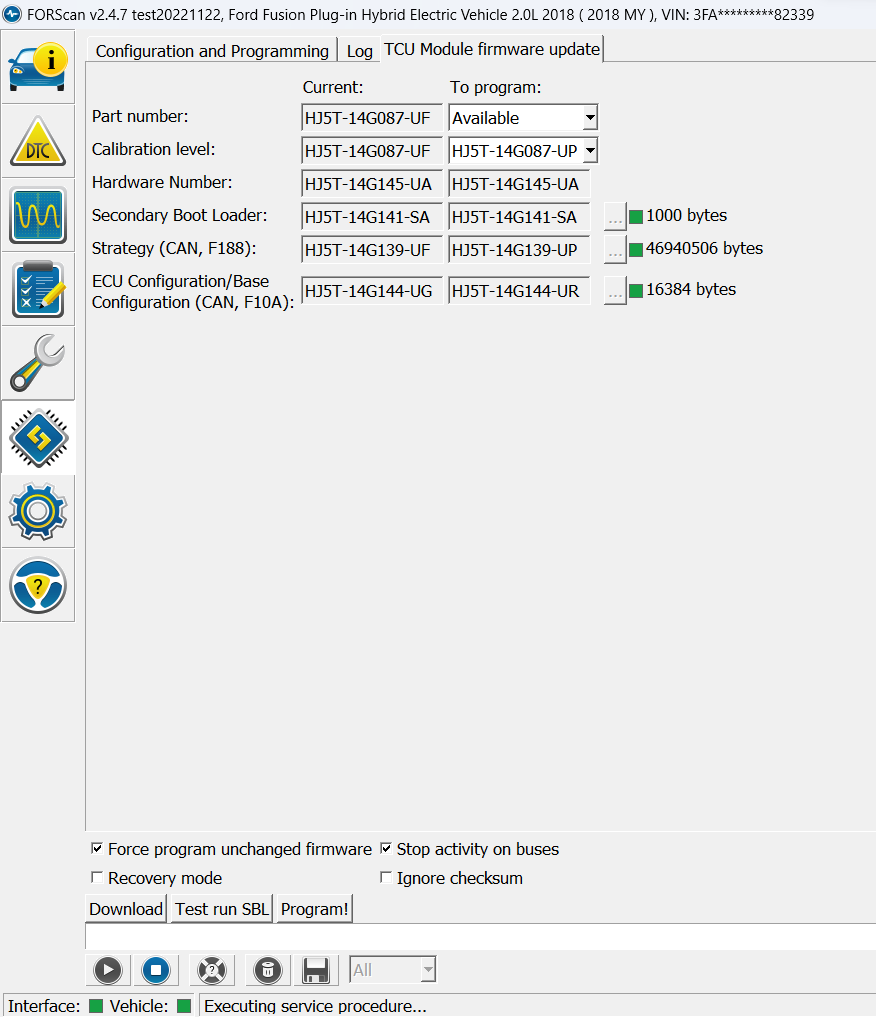
- TCU options.png (88.05 KiB) Viewed 6817 times
I should note that I originally tried to program with the Nov 16 build of 2.4.7 which always ended in the "erasing blocks failed" message after which it would back out of the update procedure. I just noticed there was a new build posted on Nov 22, which after installing now proceeds with the programming of the module regardless of block erase failures.
So some progress, but it still fails to program the module. When it starts to load the firmware, I notice that my IPC lights up and I get a bunch of warnings such as "stop safely now", "engine coolant overtemperature" and "blind spot assist unavailable". I believe when it switches to programming mode the busses aren't remaining silenced which is causing the car to freak out. Not sure if that's also the cause of the programming failure or not but it fails out after about 20 seconds of loading.
This is the output I am now getting on the Nov 22 build of 2.4.7:
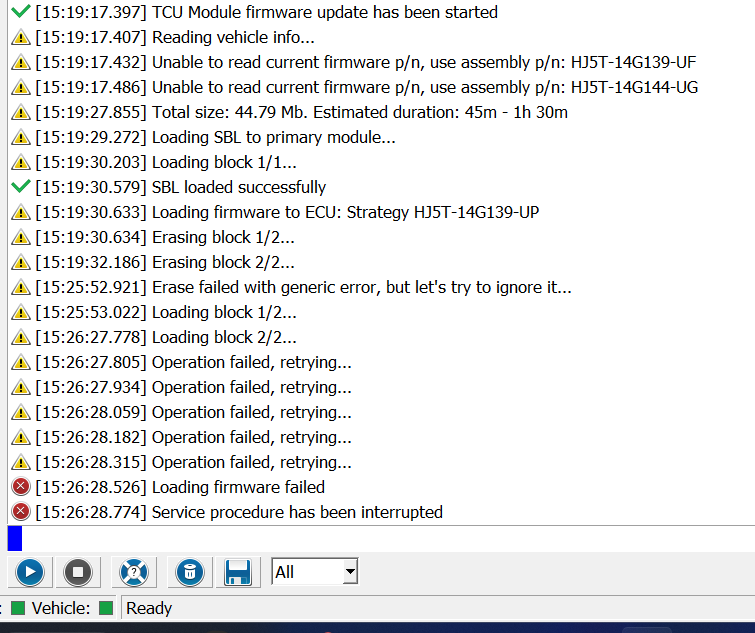
- TCU flash.png (79.77 KiB) Viewed 6817 times
Re: TCU Firmware Update Failing
Posted: Sun Nov 27, 2022 3:26 am
by elpamyelhsa
Yes, this Nov 22 build was just testing a therory of ignoring the reported erase error. The Nov 23 Test build removes this override, but adds small delays to match the FDRS style of programming being a "1-1.5 seconds delay after loading SBL and 50 ms delay between erase commands". This this also does not help.
The FORScan team now have a bricked TCU in their hands and are doing testing on it directly to figure out the issue. Hopfully they report back with some news of a recovery.
Re: TCU Firmware Update Failing
Posted: Sun Nov 27, 2022 4:23 pm
by elpamyelhsa
I may have found a patch to restore the device back to what ever firmware it was running when it died, but this will not update module, it will only restore previous functionality.
I can see your module was running HJ5T-14G139-UF so I have attached a patched version of this firmware. You will need to tick "Ignore Checksum" when programming the patched file.
Tell me how you go and tell me if any other versions are needed.
Re: TCU Firmware Update Failing
Posted: Mon Nov 28, 2022 1:37 am
by avdonr
Thanks for posting this patch, unfortunately it doesn't seem to have worked for me

I tried programming with the latest 2.4.7 beta from Nov 23 and also 2.4.6, but no luck. It says that it programmed the module successfully but something else went wrong:
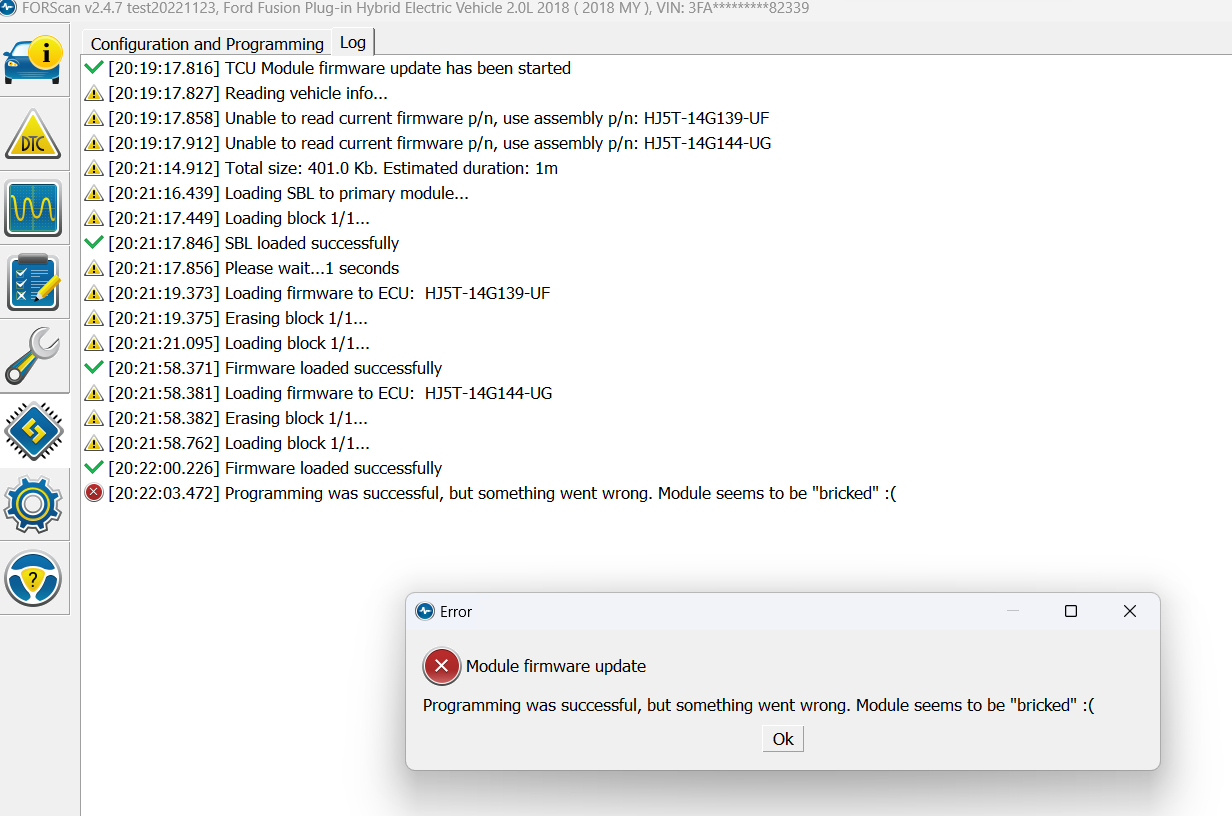
- UF patch programming.png (128.59 KiB) Viewed 6678 times
What version of FORScan did you use to program your module? I will try to match if possible.
Re: TCU Firmware Update Failing
Posted: Mon Nov 28, 2022 8:18 pm
by avdonr
Just tried to program the patch in recovery mode, but same result. "Module appears bricked" message comes up at the end of programming even though the files loaded successfully. Only thing I can think of is my second block with the main part of the -UF firmware is somehow messed up.
Re: TCU Firmware Update Failing
Posted: Sun Jan 08, 2023 10:59 pm
by dan22h
I had this problem yesterday while trying to update the firmware on my Fiesta ST, The solution I received from ForScan support fixed the issue and I was able to restore the module succesfully, see details below.
Hello,
This happens from time to time, exact reason is unknown. Module just breaks the programming with a generic error. A year ago we buyed out such a bricked TCU from one of users in Germany, he sent the bricked modules to us. We have installed it to our test stand and FORScan programmed it without any problems. We tried to program it several times, all times successful.
The following recovery sequence is recommended:
1. If possible, power off the TCU module for at least 30 minutes (greater is better, ideally - up to 24 hours). The simplest way to do it is to remove the TCU fuse. This is necessary to let all capacitors in the block to discharge.
2. Connect a battery charger and try to provide 12.7-13V during the programming. Ford recommends at least 10.6V but in reality programming for some modules work stable only on 12.5+V
3. Download and install this latest test build:
https://forscan.org/download/FORScanSet ... 230102.exe
It has some improvements in session management (to prevent the network from sleeping on long programming sessions).
4. Try to program it again.