Page 1 of 29

REMOTE START

Posted: Tue Dec 17, 2019 6:19 pm
by fordsmax471
Hi !

Remote start the car ( Ford S-Max 2.0 TDCi 2017 PowerShift )

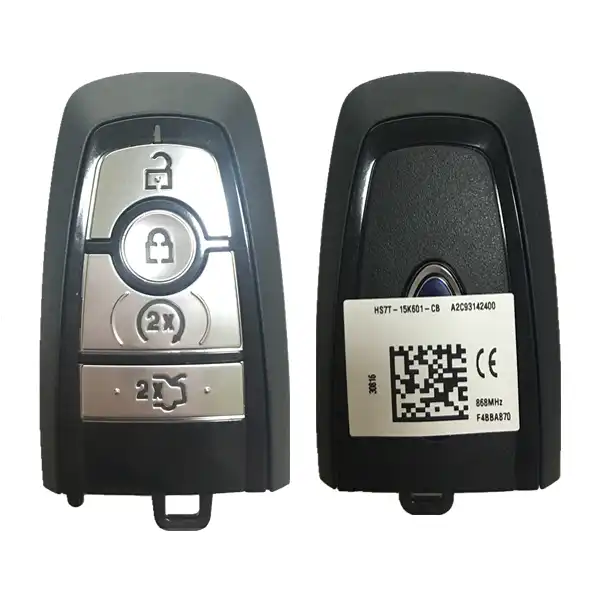
4Button Remote smart Key 433 or 434 MHZ DS7T-15K601-EF (please see ford etis )

guide for Ford S-Max mk2
To activate Remote Start, first you need a new key fob with start button (part # DS7T-15K601-EF for S-Max mk2 with 434 MHz).

:!: Note ! remove the metal blanks from the keys, the car doors are closed and the handbrake deactivated.

Programming keys
Determine the backup slot of the passive key.

:arrow: Place the first programmed key in the backup slot. Press the START / STOP button.
Wait for 4-5 seconds, then press the START / STOP button.
Extract the first programmed passive key.

:arrow: Within 5 seconds, place the second programmed passive key in the backup slot, then press the START / STOP button.
Wait for 4-5 seconds, then press the STOP-STOP button.
Extract the second programmed key.

:arrow: Within 5 seconds, place the unprogrammed passive key in the backup slot and press the START / STOP button.

Car doors lock and opened, lights blink
Congratulations on your new key being programmed !!! :)

Now use Forscan to change the asbuilt-data

BCM module- configuration parameters
• Remote start - enable

IPC module - configuration parameters
• Remote start - enable
• Remote start - climate settings- enable
• Remote start - front seat- enable (optional)
• Remote start - rear defrost – enable (optional)
• Remote start - steering feel – enable (optional)

some guides recommend
RTM module - configuration parameters
don't change anything :!: ( old keys can also be used in the future )

Re: REMOTE START

Posted: Sat Mar 21, 2020 5:23 pm
by b3nyf
Hi.

Does the ford pass app work with this? Or is it keys only. Thanks

Re: REMOTE START

Posted: Sat Mar 21, 2020 6:55 pm
by fordsmax471

Re: REMOTE START

Posted: Sat May 02, 2020 3:03 pm
by ReNeGaDo
fordsmax471 wrote: Tue Dec 17, 2019 6:19 pm Hi !

Remote start the car ( Ford S-Max 2.0 TDCi 2017 PowerShift EU )

4Button Remote smart Key 434MHZ DS7T-15K601-EF

guide for Ford S-Max mk2
To activate Remote Start, first you need a new key fob with start button (part # DS7T-15K601-EF for S-Max mk2 with 434 MHz).

:!: Note ! remove the metal blanks from the keys, the car doors are closed and the handbrake deactivated.

Programming keys
Determine the backup slot of the passive key.

:arrow: Place the first programmed key in the backup slot. Press the START / STOP button.
Wait for 4-5 seconds, then press the START / STOP button.
Extract the first programmed passive key.

:arrow: Within 5 seconds, place the second programmed passive key in the backup slot, then press the START / STOP button.
Wait for 4-5 seconds, then press the STOP-STOP button.
Extract the second programmed key.

:arrow: Within 5 seconds, place the unprogrammed passive key in the backup slot and press the START / STOP button.

Car doors lock and opened, lights blink
Congratulations on your new key being programmed !!! :)

Now use Forscan to change the asbuilt-data

BCM module- configuration parameters
• Remote start - enable

IPC module - configuration parameters
• Remote start - enable
• Remote start - climate settings- enable
• Remote start - front seat- enable (optional)
• Remote start - rear defrost – enable (optional)
• Remote start - steering feel – enable (optional)

some guides recommend
RTM module - configuration parameters
don't change anything :!: ( old keys can also be used in the future )
Well well, first of all thank you ! For sharing this for all of us, Ive just bought an Smax 2019 model that doesnt have the sync 3 hardware needed to start the car remotely.

In my personal case ( car in the sun south of Spain... , 2 little kids) this is veeeeery convenient to cool down the car so again many thanks.

So far I understand the process , i feel a bit lost on the asbuilt data part , dont expect you to detail it more( its welcome anyways ... :P) but if you can link any topic where I can find it would be super as I dont want to mess with anything.
Regards from Spain and if it happens that you com close to Alicante area youre welcome to eat a nice paella ;)

Re: REMOTE START

Posted: Sat May 02, 2020 5:11 pm
by fordsmax471
look it's
but I didn't change anything from this RTM module
2 original keys and one remote start key are working very good ;)
https://www.youtube.com/watch?v=k76ESOMS5z0

Re: REMOTE START

Posted: Sun May 03, 2020 6:55 am
by astrap16v
This is only valid for models with automatic change, right?

Re: REMOTE START

Posted: Sun May 03, 2020 7:16 am
by fordsmax471
astrap16v wrote: Sun May 03, 2020 6:55 am This is only valid for models with automatic change, right?
yes :!:

Re: REMOTE START

Posted: Sun May 03, 2020 11:09 am
by ReNeGaDo
fordsmax471 wrote: Sat May 02, 2020 5:11 pm look it's
but I didn't change anything from this RTM module
2 original keys and one remote start key are working very good ;)
https://www.youtube.com/watch?v=k76ESOMS5z0
Thanks will see if i can manage to make it once I get the key. One more question, my fob has 2 parts , the detachable key and the remote , where is the transponder located?? My key lookd like this one https://sc01.alicdn.com/kf/H12bd10b3e43 ... .jpg_.webp ( i know this is not the correct one)

Re: REMOTE START

Posted: Sun May 03, 2020 12:22 pm
by fordsmax471
it is a safe procedure, mark the keys 1, 2 and 3 and program
777.png
777.png (351.56 KiB) Viewed 74981 times

Re: REMOTE START

Posted: Wed May 06, 2020 3:26 pm
by andyh1108
fordsmax471 wrote: Tue Dec 17, 2019 6:19 pm Hi !

Remote start the car ( Ford S-Max 2.0 TDCi 2017 PowerShift EU )

4Button Remote smart Key 434MHZ DS7T-15K601-EF

guide for Ford S-Max mk2
To activate Remote Start, first you need a new key fob with start button (part # DS7T-15K601-EF for S-Max mk2 with 434 MHz).

:!: Note ! remove the metal blanks from the keys, the car doors are closed and the handbrake deactivated.

Programming keys
Determine the backup slot of the passive key.

:arrow: Place the first programmed key in the backup slot. Press the START / STOP button.
Wait for 4-5 seconds, then press the START / STOP button.
Extract the first programmed passive key.

:arrow: Within 5 seconds, place the second programmed passive key in the backup slot, then press the START / STOP button.
Wait for 4-5 seconds, then press the STOP-STOP button.
Extract the second programmed key.

:arrow: Within 5 seconds, place the unprogrammed passive key in the backup slot and press the START / STOP button.

Car doors lock and opened, lights blink
Congratulations on your new key being programmed !!! :)

Now use Forscan to change the asbuilt-data

BCM module- configuration parameters
• Remote start - enable

IPC module - configuration parameters
• Remote start - enable
• Remote start - climate settings- enable
• Remote start - front seat- enable (optional)
• Remote start - rear defrost – enable (optional)
• Remote start - steering feel – enable (optional)

some guides recommend
RTM module - configuration parameters
don't change anything :!: ( old keys can also be used in the future )
Thanks for the information, I assume this is a UK vehicle as I want to add this to my Edge. Can you tell me where you got the key from?

Andy